Should you give a flux about flux analysis?

.png)
It's the morning of the close meeting. A reviewer scans the P&L and stops on G&A: it's up $210,000 over last month with no explanation attached. Now the preparer is pulling the ledger, exporting to Excel, and rebuilding the story of a number that should have been documented two days ago, while the CFO waits. Flux analysis exists to make sure that moment never happens. Done well, it surfaces every unexpected movement before it reaches a reviewer, an auditor, or a leadership deck, and it captures the "why" behind each one while the preparer still has it fresh. This guide covers what flux analysis is, how to run it, where it breaks down, and how to make it hold up in review and audit.
Key takeaways
- Flux analysis compares account balances or activity across periods to surface unexpected movements before they become review or audit findings.
- The value is in the commentary, not the variance calculation. A number without a driver is unfinished work.
- Materiality thresholds should combine a dollar floor and a percentage trigger, tuned to the risk of each account.
- Manual flux in spreadsheets and NetSuite exports scales poorly. Data goes stale, thresholds drift, and reviewer sign-off is invisible.
- Automated flux built into the close workflow gives teams thresholds, commentary capture, and reviewer trails in one place.
What is flux analysis?
Flux analysis (short for "fluctuation analysis") compares an account's balance or activity across two points in time and asks a single question of every meaningful change: why did this move? It's one of the most common analytical procedures in a month-end close because it does two jobs at once. As a control, it catches transactions booked to the wrong account, missed accruals, and entries posted in the wrong period. As a reporting tool, it produces the narrative that explains the financials to a Controller, a CFO, or an auditor.
Here is what a single flux line looks like in practice:
The variance is arithmetic. The commentary is the work. Anyone can subtract last month from this month; the analysis is knowing that $41K of the jump is a renewal that will not repeat and $15K is a permanent step-up in headcount cost, and being able to show it.
A quick position worth stating plainly: flux run entirely in spreadsheets is a review-stage risk, not a review-stage safety net. A process that depends on manual exports and formulas that one person maintains will let something through eventually. More on why, and what to do about it, below.
Flux analysis vs. variance analysis
Searchers often use "flux analysis" and "variance analysis" interchangeably, and in casual use they overlap. The useful distinction is scope. Variance analysis is the broad discipline of explaining any difference between two figures, including budget-to-actual and forecast-to-actual comparisons that FP&A owns. Flux analysis is the accounting-specific application of that discipline: comparing actuals across accounting periods as a close control.
Flux analysisVariance analysisDefinitionPeriod-over-period comparison of actual account balances or activityAny structured comparison of an actual figure to a reference figureScopeA month-end and audit control, owned by accountingA broader FP&A and management disciplineCommon use casesMoM, QoQ, YoY actuals; audit supportBudget vs. actual, forecast vs. actual, price/volume analysisTypical outputAccount-level commentary explaining period movementsExplanations of performance against plan
At Numeric, we treat flux as a specific, close-owned form of variance analysis. Every flux is a variance analysis; not every variance analysis is a flux.
Why flux analysis matters at close
Flux is not an optional analytical flourish at the end of the close. It's the last structured control that runs before the numbers leave accounting, and it's often the first place anyone sees a surprise. That gives it two distinct jobs.
Catching issues before review
Flux is your last chance to catch a bad accrual or a misposted entry before the CFO sees it. When thresholds and commentary are captured as preparers work, an unexpected $210K swing in G&A gets flagged, investigated, and explained on the day it posts, not on the morning of the close meeting. The alternative is the scramble described at the top of this piece: a reviewer finding a large unexplained movement in real time, and a preparer reconstructing the reason under pressure. No more finding a $500K swing on the day of the close review.
Leadership visibility
Flux is usually where leadership first learns that something changed in the business. A well-run flux turns that into an asset instead of a liability. When the accounting team can walk into a monthly review with every material movement already explained, leadership gets clean line-of-sight and no late surprises. In Numeric, that commentary flows straight into the reporting leadership actually reads, so the explanations sit next to the numbers. STASH's Director of Accounting put it directly after moving flux into their monthly CFO reporting: flux became "the biggest improvement by far" in what accounting delivered to the executive team.
Balance sheet flux vs. income statement flux
Flux works differently depending on which statement you're analyzing, because the two surface different kinds of problems. Balance sheet flux is primarily a check on whether accounts are correctly stated and reconciled. Income statement flux is primarily a read on operational change and cutoff.
The balance sheet point is worth dwelling on: the absence of an expected change is itself a signal. If a deferred tax liability is due in a given month and the balance doesn't move, the flat balance likely signals a missed or misrecorded payment rather than a clean account. Good flux asks "what did I expect to see?" and treats a missing variance as seriously as an unexpected one.
Comparison periods for flux analysis
The comparison you choose determines what the flux can catch and who it serves. Most teams use more than one.
- Month over month (MoM): The workhorse for close preparers. Best for catching in-period errors quickly while detail is fresh.
- Quarter over quarter (QoQ): Smooths out single-month noise. Useful for board and investor reporting.
- Year over year (YoY): Controls for seasonality and is the comparison auditors most often want for substantive review.
- Budget vs. actual: An FP&A and accountability lens. Best for explaining performance against plan.
- Forecast vs. actual: A leadership lens that feeds reforecasting and shows how the latest view is tracking.
A practical default: preparers run MoM every close, layer in YoY for audit-sensitive accounts, and reserve budget and forecast comparisons for the reporting that goes to finance leadership.
How to perform flux analysis step by step
- Define scope and comparison period. Decide which accounts you're fluxing and against what (MoM, YoY, budget). Natural ledger accounts are usually the right level of detail. Financial-statement-line-item aggregation hides offsetting errors; over-disaggregation by every dimension creates busywork.
- Pull the data. Gather current and prior-period balances and the underlying transaction activity. This is the step that anchors flux to the rest of the close workflow, where it runs as a defined task with an owner and a due date rather than an afterthought.
- Apply materiality thresholds. Flag only the variances that clear your dollar and percentage triggers so preparers spend time on movements that matter (thresholds are covered in the next section).
- Investigate each flagged variance. Drill into transaction detail to find the driver, and correct any errors you surface. Flux and reconciliations are complementary controls here: recs prove the balance is right, flux explains why it changed. When a flux uncovers a stale schedule, that's a signal to revisit the reconciliation workflow for that account.
- Write the commentary. Document the driver in plain language while you have the context, with amounts attributed to specific causes.
- Route for reviewer sign-off. A reviewer confirms each explanation, creating the record that leadership and auditors will rely on.
Common drivers to expect by account type, as a starting reference during investigation:
- Accruals: true-ups, releases, and newly recognized obligations.
- Prepaids: amortization run-off and new prepaid additions.
- Revenue: volume changes, pricing changes, and cutoff timing.
- Operating expenses: headcount changes, one-time vendor spend, and seasonal patterns.
Setting materiality thresholds
Thresholds decide what gets explained. Set them too high and small errors slip through; set them too low and preparers burn hours justifying movements that don't matter to the business. The reliable approach is a hybrid: a percentage trigger to catch proportional shifts, paired with a dollar floor so a large but small-percentage swing in a big account still gets caught. A common calibration point is to align dollar thresholds with the materiality levels auditors use, such as 1% of pre-tax income, 0.25% of revenue, or 0.1% of total assets.
Illustrative thresholds by account type:
Tune these to account risk rather than applying one rule everywhere. A volatile usage-based revenue account and a stable rent expense do not deserve the same trigger. The catch with manual thresholds is drift: rules kept in a spreadsheet quietly diverge across preparers and periods, especially as the team and entity count grow, until two people are fluxing the same account to different standards.
Writing flux commentary that holds up in review and audit
Commentary is the deliverable. A variance without a driver is unfinished work, and commentary that only its author can decode is a liability the moment that person is on vacation or an auditor asks a follow-up.
This is also the part AI is now good at. Numeric's AI flux analysis drafts a first-pass explanation from the underlying transaction detail, so the preparer edits and approves instead of writing from a blank cell.
Do:
- Attribute the movement to specific, quantified drivers ("$41K SaaS renewal, $15K new seats"), not vague causes ("timing").
- Write for someone who wasn't in the ledger with you.
- Note whether the change is expected and whether it recurs.
- Reference the support (the invoice, the schedule, the entry) so a reviewer can verify without asking.
Don't:
- Bury the explanation in a cell comment or a Slack thread where the story of the number lives in one person's head.
- Restate the math ("increased by $56K") without explaining the cause.
- Leave a reviewer to reconstruct the reason from raw transactions.
Audit-ready flux
Auditors request flux support every period, and for year-end they want the full story. When commentary lives in cell comments, email chains, and reviewer memories, producing that support means rebuilding the narrative from scattered pieces, which is where close teams lose days. Audit-ready flux is the opposite: each explanation is captured in one place, tied to its support, and carries a reviewer sign-off with a timestamp. The record is audit-ready by default because it was built as the work happened, not reassembled after the request comes in.
Common pitfalls
Most flux problems trace back to one root cause: the process runs on manual GL pulls into Excel. Pulling data from NetSuite (or any ERP) into a spreadsheet each period means the analysis starts from a snapshot that's already aging, formulas that break quietly, and commentary that only the preparer can decode. The failure is rarely dramatic. It's a threshold formula that stops flagging an account because someone added a new GL code mid-quarter and the range never got updated, so a real variance sails through unexplained. It's the reason senior accountants describe flux as being "in the weeds," pulling GL data at midnight to answer a question that should have been documented weeks earlier.
- Stale data from manual ERP exports. A manual export is a point-in-time snapshot. By the time you've built the pivots and started writing commentary, later entries and adjustments have posted, and the analysis no longer reflects the ledger.
- Threshold drift and inconsistency. Thresholds maintained by hand diverge across preparers and periods. As headcount and entity count grow, "material" comes to mean something slightly different on every tab, and consistency erodes.
- Commentary that lives in one person's head. Cell comments, DMs, and email chains are invisible to reviewers and auditors. When the preparer is out, so is the explanation.
- No reviewer trail. Sign-off in a spreadsheet is informal and unverifiable. There's no durable record of who reviewed what, or when, which is exactly what an auditor asks for.
How automation changes flux
Automating flux doesn't take the accountant out of the analysis. It takes out the parts that were never analysis to begin with: the exporting, the pivoting, the formula maintenance, the chasing of sign-offs. This is the core of what Numeric does. Numeric's flux analysis runs inside the close rather than alongside it. It applies materiality thresholds automatically, uses AI to draft variance explanations from live transaction-level detail in your ERP for the preparer to edit and approve, captures that commentary against the account, and records reviewer sign-off in one place. The preparer's time shifts almost entirely to the "why."
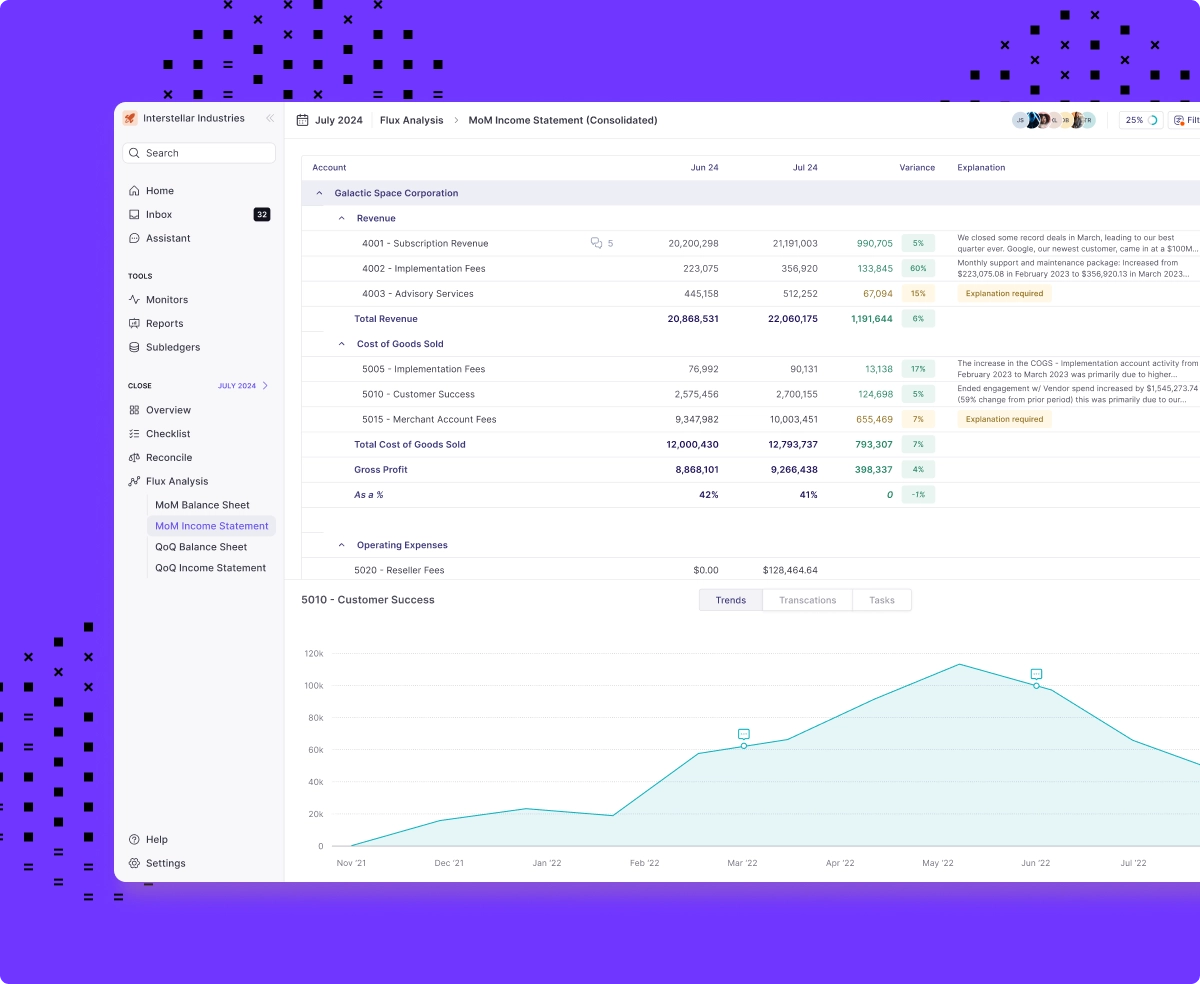
It also reframes flux as one layer of control rather than a lone safety net. Numeric's transaction monitors catch data issues in-period, before the close even starts, so fewer surprises surface at flux time. Flux stops being the single net that has to catch everything and becomes the last check in a stack that Numeric has been filtering all month.
For teams whose flux commentary needs to reference data outside the ERP, Numeric's MCP lets tools like Claude and other AI assistants pull live flux context and trigger downstream close workflows without leaving the systems accountants already work in.
For teams ready to move flux off spreadsheets, schedule a demo to see Numeric run flux end to end, from the first threshold to reviewer sign-off.
Frequently asked questions

Related Content
.png)
Expense Allocation in Accounting: From Shared Costs to True Margins (and Why the Usual Methods Break)
Learn what expense allocation involves, why it's essential for fully loaded P&Ls and true margins, and why spreadsheet models and aggregate JEs keep failing, plus how to fix the root cause.
.png)
Multi-Entity Consolidation: What It Involves, Why It Breaks, and How to Fix It
Learn what multi-entity consolidation involves, why it breaks as companies grow, and why both Excel and add-on tools share a structural flaw. A guide for controllers and VPs of finance.
.png)
How to Build an AI Audit Trail for Your Accounting Workflows
A practical guide to AI audit trails for accounting: what to capture, why SOX, PCAOB, and GAAS require traceability, and how to audit AI agents and skills, not just AI features bolted onto your close software.