Streamline the Month-End Close: A Step-by-Step Guide

.png)
Hiring plans, budgets, and overall company strategy hinge on the insights produced by the month-end close. But for teams operating without appropriate coordination and mostly manual processes, arriving at those insights can take up to 10 business days.
10 business days is essentially half of each month – that’s a long time for your leadership team to be navigating without a compass.
By comparison, a streamlined month-end close can take as few as three business days. In just 72 hours, the books can be closed, leadership can get the insights they need, and your organization’s accountants can get back to doing other impactful work.
This article will cover how to streamline the month-end close while still delivering quality reporting and insights. Given how critical the close is to every mature organization, achieving faster, less burdensome closes should always be a priority.
Key Takeaways
- Streamlining the month-end close down to 3-5 days is possible, even for large organizations
- Before attempting to automate processes, standardize and document them
- Close checklists (including industry specific ones) are immensely valuable
- An ideal month-end close is not only fast, but consistent
- Accuracy always takes priority over speed
How to Streamline the Month-End Close
If your objective is to streamline the monthly close, consider a bottom-up approach. Solving the pain points at each step of the close, then retooling the overall close process so that these steps work in harmony, is how your month-end close can go from chaotic to cohesive.
When scoping out a potential month-end close modernization, the first question that may come to mind is how many days to target for the new and improved close. Industry benchmarks vary, but a realistic range for most companies is around 5-7 days. Closing in fewer than five days is also possible in many cases, but may require ongoing iteration depending on how highly manual your process is to start.
With the initial modernization push in mind, we’ve mapped out a phased approach for streamlining your month-end close below.
Step 1: Map and Audit Your Current Process
Just how manual is your current process? Being able to answer this question and identify the bottlenecks in your month-end close is the first step to building a better workflow.
Here’s how to uncover where your close might be stalling out:
- Create a detailed inventory of all close tasks. For each task, identify owners, subtasks, and data sources.
- Identify dependencies and build a timeline using a Gantt chart.
- Download existing general ledger data. Review it to determine:
- How were journal entries booked?
- What systems were used?
- Who booked each entry?
- When was the information first available?
- Interview stakeholders and familiarize them with upstream and downstream dependencies.
- Create a high-level swim-lane diagram to identify who benefits from the completion of month-end close activities. Look for major bottlenecks based on dependencies, workflows, and stakeholder feedback.
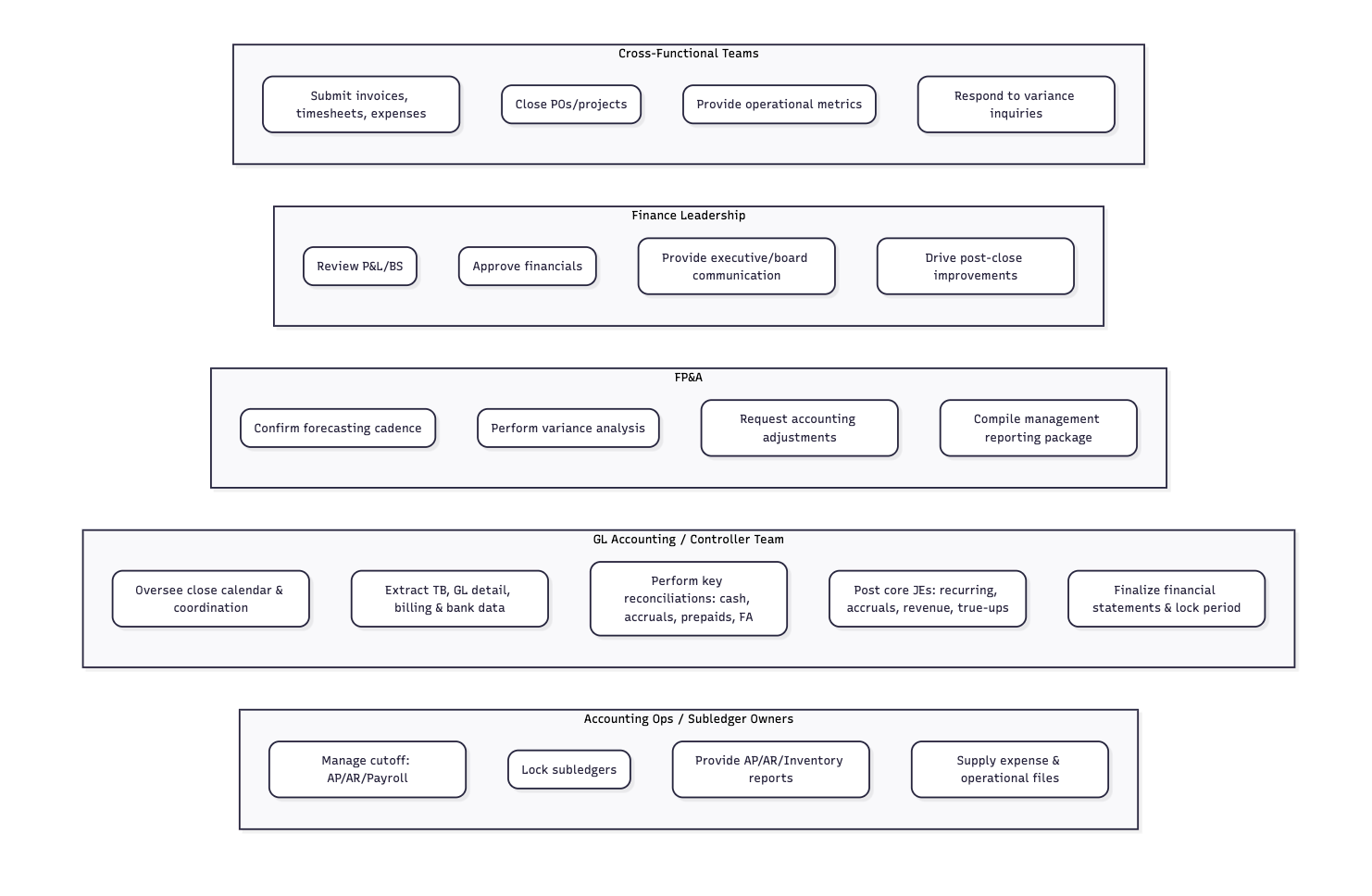
Ideally, this step-by-step audit will reveal where your workflow depends on time-consuming manual tasks, who is currently responsible for those tasks, and how they’re handling them. If one of your staff accountants, for example, spends time each month manually copying payroll data from the HR system into a spreadsheet in order to book payroll accruals, that may pose a bottleneck on the accountant’s time or on downstream dependencies.
Step 2: Standardize and Document Everything
At Numeric, we believe in the phrase, “standardize first, automate second” because it reminds us not to try to optimize processes unless they’re well-understood.
Standardizing, in this context, means to create repeatable, documented rules for accomplishing a given task. Recurring tasks (like the ones involved in your month-end close) are particularly important to standardize because doing so prevents errors and leads to greater efficiency, even before you implement any automation.
Templates are one effective tool for standardizing your workflows..
Note: Numeric offers a selection of free accounting templates, including a month-end close checklist template. In addition to our standard month end-close checklist template, Numeric offers industry-specific close checklist templates for:
Your templates, along with other essential financial documents, should live in a centralized data repository or document management system. This reduces time spent searching for documents and makes your team more audit-ready. It’s also a good idea to standardize the structure of this system, using clear folder hierarchy and consistent naming conventions.
Step 3: Build a Comprehensive Close Checklist
The close checklist is your team’s master document for tracking progress toward the month-end close. Task categories, individual tasks, frequency (whether monthly, quarterly, or annually), and actual task descriptions provide an overview of the close. Preparer and reviewer tags (plus due dates for each), as well as business day due dates, create accountability.
Companies might begin this work in Excel or a project management tool like Asana, etc., but high-level finance teams often use a dedicated close management tool like Numeric to put the close on autopilot.
No matter the size of your organization or the industry you’re in, using a standardized close checklist promotes diligence and efficiency. When everyone on your team is invested in completing the same master checklist, they’re more likely to be invested in delivering a speedy and effective close.
Step 4: Move Tasks to the Pre-Close Period
If your month-end close is painful, then a “continuous close” or “continuous accounting” might sound downright agonizing. In fact, it’s just the opposite.
One reason why the traditional month-end close is stressful is because all the work is frontloaded to the beginning of the subsequent month. Closing the November books, for instance, involves several intense days of work at the beginning of December. The idea behind the continuous close is to distribute this work during the month of November itself, lightening the workload during those critical first days of December.
In practice, this can mean processing amortizations continuously, doing some variance and flux analysis and commentary mid-month, or monitoring transaction data in order to catch miscodings as they occur. Any activity that can be shifted from the close period to pre-close is a potential break for your team when crunch time comes.
Continuous accounting, however, relies on high-quality, real-time data. Managing data complexity will enable you to address the bottlenecks which typically challenge the feasibility of continuous accounting, and creating robust data integrations will aid with speed and accuracy.
That’s why teams like using Numeric, where best-in-class ERP integrations make data visibility as real-time as possible, and reporting and monitoring tools reveal any omissions or other errors.
Step 5: Automate Routine Tasks
The preceding steps are intended to improve your month-end close, but really, they’re the precursors to automating as much of your workflow as possible.
When processes are automated, it can be as easy as setting a schedule for them to run without any human intervention. In other cases, a team member can click “run” or “refresh” and the system will automatically run a task. This turns manual tasks of 30-60 minutes (or longer) into quick reviews and quality checks.
Although automations require time to set up and maintain, there’s no doubt that they create value during the close, when your team’s time is most precious. Setting up Monitors in Numeric, for example, allows you to receive automated alerts that catch errors ahead of month-end reconciliations. Numeric clients like Soundstripe are also leveraging balance sheet automation by using automatic alerts and connected schedules to stay ahead of the month-end close, even during team member PTO periods or new member onboarding.
Step 6: Establish Clear Communication Protocols
The month-end close is important because it provides stakeholders with the data points, reports, and insights they need to make decisions. An outstanding close process recognizes this fact and earns buy-in from stakeholders during the close process itself.
When you let stakeholders know about close-related issues or changes ahead of time (or even set up regular check-ins on your continuous close efforts), it creates trust in your process. Stakeholders who base forecasts on the results of your close want to know whether those results will be delivered reliably and on-time. And, if you want to modernize your month-end close, the teams who depend on it deserve a seat at the table.
Firstly, establish a clear pattern of communicating material changes in your close process. Then, consider implementing real-time dashboards or checklists that show your team’s progress on continuous and month-end close tasks.
Numeric: the #1 tool for continuous closes
.png)
How to Balance a Faster Close with an Accurate Close
A speedy month-end close isn’t worth much if its outputs aren’t accurate. Accuracy is essential, and should be prioritized over speed if the difference between an estimate and a more exact figure could make a difference to the organization. Cost estimates, for example, might not be as material as revenue figures.
So, balancing speed and accuracy doesn’t mean sacrificing one or the other; it means optimizing for the necessary level of accuracy first, and optimizing for speed second. Thankfully, it’s not difficult to deliver accurate data and insights if you use the right tools and processes (which also help the month-end close happen more quickly).
Edwine Alphonse, former Controller at Ramp, illustrated the importance of speed insofar as it improves her team’s performance on a number of fronts:
“If I spent the full month closing, it would become the sole focus of my work. I wouldn’t have time to build processes, create controls, mentor my team, or focus on audits.”
Better processes, closer controls, and thoughtful mentorship will make your accounting team happier and better at their jobs. These investments are possible when the month-end close isn’t taking up massive chunks of time.
H3: Implement Risk-Based Reviews and Materiality Thresholds
Your team’s expertise is an asset. Automation actually enhances the value of this asset by directing your team’ bandwidth away from routine, repetitive tasks and towards high-impact areas that require human judgment, like high-risk account reviews and variance investigations.
Setting up materiality thresholds (which automatically set aside variances or transactions which fall below a certain dollar or relative value) is one way to preserve your team’s focus for the work that matters. Similarly, risk-based reviews greatly increase the likelihood that errors, misstatements, or other anomalies will be caught by human reviewers.
Wherever major issues are likely, and especially where those issues have the potential to be impactful—that’s where your team should spend their time.
H3: Conduct Post-Close Reviews
After each month-end, quarter-end, or year-end close, a formal team review can help your team catalog where the close went well and where it didn’t.
Delays, mistakes, and bottlenecks happen. They’re not necessarily cause to overhaul your entire workflow, but identifying them and documenting their impact is necessary. When it’s time for the next month-end close, these issues will be top-of-mind for your team.
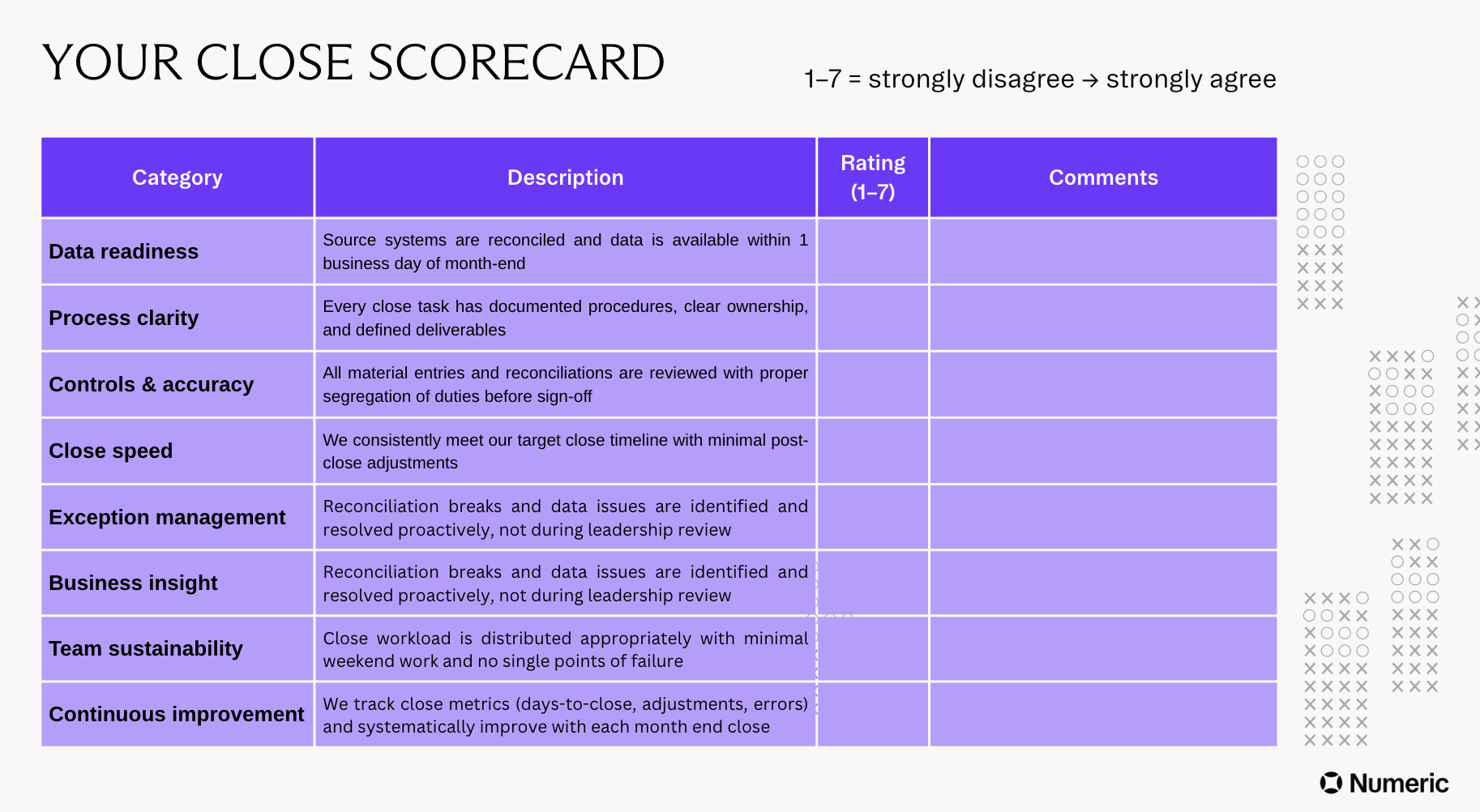
Teams can use our financial close scorecard to help assess their close maturity. This scorecard provides evaluation criteria for eight distinct categories, all of which we formed after speaking with accounting teams about their internal close KPIs.
To use the template, score your team’s performance for each category using a 1-7 Likert scale where 1 = Strongly disagree; 2 = somewhat disagree; 3 = slightly disagree; 4 = neutral, and so on and so forth. By measuring progress via the scorecard, it’s easier to assess if your team seems to be moving up in the month-end close maturity model as well.
H2: Measuring Improvements: KPIs and Metrics
Of course, no modernization initiative would be complete without a set of KPIs to track progress and calculate ROI. Performance measurement is important for the close because, as Michael Litwin of OpenStore says,
“It's an ongoing process. I've never had two closes in a row that were exactly the same. You can almost always find one thing you can improve upon or make a little different to try to catch something you missed last time.”
Keeping a close eye on metrics will enable you to make each close more successful than the last. We’ve gathered a few of the most important metrics for the month-end close below.
H3: Core Metrics to Track
Common Pitfalls to Avoid
Throughout this article, we’ve emphasized the importance of taking a phased, methodical approach to the project of streamlining your month-end close. The reason for this emphasis is that pitfalls do exist on the path to close modernization, and we’ve outlined a few of them below:
Trying to automate everything at once. Yes, the manual close is a mess. But ripping and replacing with end-to-end automation is going to create more chaos than your team can handle. Start with one or two high-impact areas, prove that your solutions work, and automate selectively from there.
Neglecting change management. Your accounting team owns the month-end close, and no matter how much automation or other technological change you introduce, they’ll continue to own it. Getting your team’s buy-in early will ensure that your changes actually lead to the results you’re hoping for, as your team are the ones who will need to execute the close.
Not maintaining documentation and audit trails. Using the right tools can help, but ultimately, documentation and auditability are the responsibility of your organization’s finance team. Set up your tools, databases, and integrations to automatically create and categorize the right documents, but also audit and iterate on these systems during review periods.
Focusing only on speed without ensuring accuracy. You could have a one-day month-end close, but if your data isn’t 100% accurate, you may as well not close the books at all. Always keep in mind that the month-end close is a value driver across your entire organization, and it’s your job as accountants to deliver information that can be acted on with confidence.
The Right Tools to Accelerate Your Month-End Close
Even today, spreadsheets still form the backbone of many accounting teams’ month-end close operations. Spreadsheets and Excel aren’t bad per se (with 94% of teams using Excel in their close), but heavy reliance on them poses a threat to your month-end close.
In fact, in the same survey, 50% of teams reported that Excel is a key reason why their month-end close is slow. Why? Excel doesn’t scale with transaction volume, doesn’t handle version control well, and results in manual errors (to name just a few reasons).
It’s perfectly fine to continue using Excel where it makes sense. But to achieve a modern month-end close process, you’ll need to use modern tools.
How Numeric Automates the Entire Close Lifecycle
It’s our mission to help you close the books on time, every time, month after month.
Numeric works with accounting teams across the close maturity model to implement well-documented, automated, and proactive month-end processes with close automation software.
Putting close management on autopilot
Get started with Numeric’s close checklist, a project management tool purpose-built for accounting teams. There, you can organize your month-end close process, map out dependencies, and provide full visibility on the status of your close.
With Numeric’s AI Insights, you can also generate exec-ready reports of close performance to-date and see which tasks are moving slower than usual versus prior periods.
Automating reconciliations from Cash on up
Numeric enables teams to automate reconciliations, leverage AI for flux analysis, and reduce the manual work involved in their month-end close.
Cash reconciliations, one of the most tedious workflows in accounting, can be automated by 90+% using Numeric’s Cash Management tool. Teams like Brex rely on Numeric’s cash tooling to automate JE posting, match 90+% of their cash accounts, and sync up to each of their hundreds of bank accounts.
An analytics engine to power your finance insights
Numeric empowers accounting teams with real-time transaction monitoring to flag anomalies and ensure compliance with accounting policies. With flexible reporting and search tools, teams use Numeric to quickly elevate insights to the business and integrate more closely with the FP&A function.
Conclusion
If the month-end close process gives you anxiety, you’re not the only one. Manual, lengthy close processes have been the norm for most organizations, but technology is unlocking new approaches to the close that cut down on stress while generating better outputs.
Change doesn’t happen overnight, though. To truly modernize your month-end close, you’ll first want to dissect it, examine its components, and use the tools at your disposal to optimize those components. Then, when you recombine everything into a new, streamlined process, the end result will be greater than the sum of its parts.
To learn more about Numeric’s approach, schedule a demo and discover what a streamlined month-end close could do for your organization.
Related Content
.png)
Numeric vs. Maxima: Which AI Close Platform Fits Your Team?
Numeric and Maxima both automate close work. Compare how each handles reconciliations and cash matching, who owns the rules, and when each one fits.
.png)
7 NetSuite Reporting Tools, and When to Just Replace NetSuite
Compare 7 NetSuite reporting tools by use case and cost, and learn when replacing NetSuite solves reporting problems at the source.
.png)
What Is Multidimensional Accounting? Benefits, Examples, and 3 Steps to Set It Up
Learn how multidimensional accounting tags transactions by department, product, and customer, with examples and 3 steps to set it up.