The 15 Best Financial Close Software Tools for Accounting Teams

.webp)
Every month, accounting teams rebuild the same process from scratch. They chase down transactions, match balances across systems, write flux commentary in spreadsheets, and hope nothing slips through before the books close.
For most teams, the close still lives across a patchwork of Excel files, Slack threads, and tribal knowledge, which means late surprises during review, senior accountants stuck as bottlenecks, and Controllers who can't answer the CFO's questions in real time.
The category of tools designed to fix this has matured significantly. Financial close software (also called close management or month-end close software) now ranges from lightweight checklist tools to full-stack platforms with transaction-level ERP integration, AI-generated variance analysis, and real-time monitoring. The most meaningful shift: the move from period-based, backward-looking close toward continuous close, where transaction monitoring, always-on reconciliations, and AI-assisted flux happen throughout the month rather than in a frantic sprint at the end.
This guide ranks 15 close platforms across features, ERP fit, implementation timeline, and pricing, so you can match the right tool to your team's size, ERP, and workflow maturity rather than chasing the longest feature list.
Key Takeaways
- The right close platform depends more on team size, ERP, and workflow maturity than on raw feature count.
- Enterprise tools like BlackLine and Workiva need dedicated admins; mid-market teams often outgrow the setup cost before seeing ROI.
- The category is shifting from period-based close to continuous close through transaction monitoring, AI-assisted flux, and always-on reconciliations.
- ERP integration depth is the biggest predictor of implementation success. Match the tool to your GL, not the other way around.
- AI and MCP-style integrations are reshaping how teams orchestrate the close, especially teams already using Claude or ChatGPT.
The 15 tools covered in this guide include:
- Numeric
- BlackLine
- FloQast
- Cube
- Workiva
- Adra by Trintech
- OneStream
- Ledge
- Lucanet
- Planful
- Vena Solutions
- Prophix
- Maxima
- Redwood
- JustPerform
What Financial Close Software Does
Financial close software centralizes the month-end process in a single system of record. For most teams, the close still lives across a mix of spreadsheets, Slack threads, and tribal knowledge, which makes it fragile every time someone's unavailable or the business grows. Close software fixes that by replacing scattered workflows with structured, auditable processes.
This matters because Controllers and VPs of Finance often can't answer CFO questions in real time because close data is scattered across spreadsheets, email, and disconnected systems. Modern close platforms exist in large part because that lag became unacceptable.
The best tools now give leadership live visibility into where the close stands, which accounts are reconciled, and where bottlenecks are forming, without waiting for a status meeting.
The broader direction the category is heading is continuous close. Rather than treating reconciliation, monitoring, and analysis as month-end sprints, modern platforms run transaction monitoring intra-month, maintain always-on reconciliations, and use AI to draft variance explanations as changes happen. This separates the current generation of tools from legacy platforms that still operate on a batch-and-review model.
Core capabilities to evaluate include:
- Reconciliation management: Automated account reconciliations that compare the GL against subledgers, flagging discrepancies and resolving straightforward matches. The key differentiator is integration depth: some platforms pull trial balance snapshots in batch, while others maintain continuous, transaction-level sync with your ERP.
- Journal entry tracking: Systematic creation, review, and approval of journal entries with full audit trails and timestamps.
- Task management: Close checklists with dependencies, preparer/reviewer assignments, deadlines, and auto-rollforward, built specifically for accounting workflows rather than repurposed project management tools.
- Reporting and analytics: Flux reports, P&L management views, and the ability to build reports and pivot by department or vendor with drill-down to transaction-level detail.
- Integration capabilities: Native connections to ERPs (the depth of which varies significantly across vendors) and other financial systems. For teams deciding between NetSuite vs QuickBooks, integration support is a major factor in platform selection.
Financial Close Software at a Glance
Before diving into each vendor, here's a side-by-side comparison of pricing, ERP fit, and typical setup time across all 15 tools.
| Tool | Best For | Starting Price | ERP Fit | Typical Setup Time |
|---|---|---|---|---|
Numeric |
Mid-sized to enterprise teams needing transaction-level visibility and AI-driven close | $30/mo/user (Essentials); Custom (Growth/Enterprise) | NetSuite, Sage Intacct, QuickBooks, Xero, Workday | <1 month |
BlackLine |
Large enterprises with dedicated admin teams | Custom | SAP, NetSuite, Oracle, Dynamics, Sage Intacct, Workday (broad) | ~6 months |
FloQast |
Teams needing lightweight close checklists and task management | Custom | NetSuite, SAP, Oracle, Sage Intacct, Dynamics 365, Workday, QuickBooks (broad) | ~2 months |
Cube |
FP&A teams that want close and consolidation alongside budgeting | Custom | NetSuite, QuickBooks, Xero, Sage Intacct | 4–8 weeks |
Workiva |
Public companies with SEC/XBRL filing needs | Custom | NetSuite, SAP S/4HANA, Oracle, Dynamics, Sage Intacct, Workday | ~4 months |
Adra by Trintech |
Mid-market teams with high-volume transaction matching | Custom | NetSuite, SAP, Oracle, Dynamics, Workday, Planful | Varies |
OneStream |
Upper mid-market/enterprise seeking unified CPM | Custom | SAP, Oracle, NetSuite, Dynamics 365 BC, Infor, Sage Intacct | ~8 months |
Ledge |
NetSuite-first teams wanting agentic AI close automation | Custom | NetSuite (primary), 11,000+ banks, 150+ integrations | Varies |
Lucanet |
European/mid-market teams needing multi-standard consolidation | Custom | 300+ interfaces (DATEV, Abas, Exact, Cegid) | ~3 months |
Planful |
FP&A teams that also need basic close capabilities | Custom (~$800–$1,250/mo per third-party estimates) | SAP, Oracle, NetSuite, Dynamics 365, Sage Intacct, QuickBooks | ~5 months |
Vena Solutions |
Teams built on Microsoft Dynamics 365 and Excel | Custom | Microsoft Dynamics 365 (deepest), NetSuite, Sage Intacct, QuickBooks, SAP | ~5 months |
Prophix |
Organizations needing the broadest ERP compatibility | Custom | NetSuite, SAP, Dynamics, Sage, Oracle, Workday, QuickBooks, Acumatica, Epicor, Infor | ~4 months |
Maxima |
Enterprise teams wanting AI-native accounting automation | Custom | NetSuite (primary), Sage Intacct, Stripe, Ramp, Brex, Workday, Rippling | Varies |
Finance Automation by Redwood |
SAP-first enterprise environments | Custom | SAP (deepest), Oracle, Microsoft, Workday | Varies |
JustPerform (insightsoftware) |
Multi-ERP environments needing consolidation | Custom | SAP, Oracle, NetSuite, Dynamics, Sage, Epicor, Infor, Deltek, Yardi | Varies |
15 Best Financial Close Software Tools
Our research and analysis of dozens of close management platforms produced this ranked list. For each tool, we cover features, pricing, implementation timeline, pros and cons, and which teams are the best fit.
1. Numeric: Best Overall Financial Close Software

Whether your team has outgrown a first-generation close tool or is still running the close across spreadsheets and Slack, Numeric's close product gives you a centralized close foundation with the reporting, monitoring, and reconciliation capabilities to close with confidence.
Teams like Asana and Riskified choose Numeric because of its advanced task management (including dependencies and multiple reviewers), deep transaction-level ERP sync, and AI-powered flux analysis that make it easy for teams to pull the exact data they need, when they need it. The result is that your senior accountants stop being the bottleneck doing and reviewing every reconciliation, and start leading the team through the close.
Best For
- Accounting teams of all sizes that need transaction-level visibility, fast implementation, and a modern close platform
Key Numeric Features
- Close Checklist: Purpose-built task management for the month-end close with dependencies, review notes, reconciling items, preparer/reviewer workflows, and auto-rollforward between periods
- Continuous ERP sync that pulls transaction-line-level detail from NetSuite in real-time, plus trial-balance data from Sage Intacct, QuickBooks, Xero, and Workday, so when your CFO or FP&A team asks a question, you can answer it immediately
- One-click reconciliations that autosubmit recs where the connected workpaper and GL balance match; if the balance no longer ties out, Numeric sends a notification and points you to the transaction causing the discrepancy

- Cash Management and Cash Matching: Automate 90%+ of bank reconciliations with AI-generated matching rules.
- AI-powered flux analysis that automatically identifies variance drivers and generates tailored explanations for period-to-period changes directly from GL data.
- Reporting: Build complex reports, pivot by department or vendor, and drill to transaction-level detail without exports.
- Transaction monitoring with customizable alerts to catch errors before month-end reconciliations, not during them.
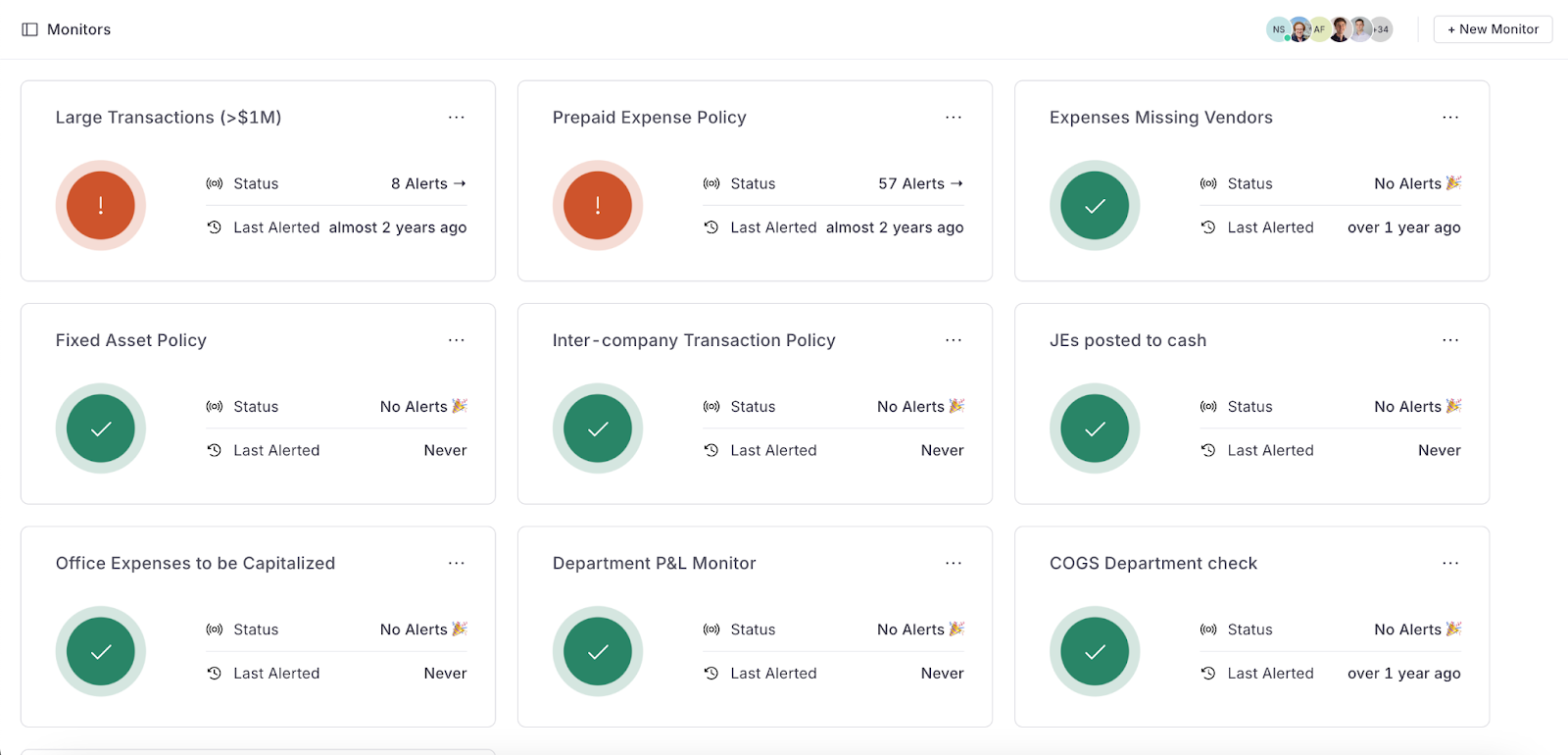
- Slack integration that notifies you for changes, updates, or reminders on your tasks
- Complete audit trail with timestamps for all comments, tasks completed, and signoffs; workspaces include free, view-only licenses for auditors
Customer Results
Teams like Awardco have increased close efficiency by 33% and saved 4 days per month on their close after switching to Numeric.
What customers say on G2:
Numeric provides a centralized place where a lot of our previously disparate month-end close "work now lives. Our checklist, reconciliations, recurring journals, flux tasks, etc. have increasingly moved into Numeric since we implemented the tool. Every close has gotten consistently & increasingly smoother, as a result." Andrew Z., accounting manager
Numeric Pricing
Numeric offers three packages:
- Essentials: $30/month/user. Great fit for teams looking to organize and add visibility to the close.
- Growth: Custom pricing. For teams automating and streamlining month-end, typically on QuickBooks and Xero.
- Enterprise: Custom pricing. For teams on mature ERPs like NetSuite that need a continuous, controlled close process.
Numeric Setup
Most teams are up and running within a week. Getting started requires importing your existing close checklist, integrating with your GL, and launching.
Numeric Pros
- All-in-one close management platform with reconciliations, flux, monitoring, cash management, and reporting
- Numeric's MCP (Model Context Protocol) lets teams query close data and trigger close workflows from Claude, ChatGPT, or any MCP-compatible tool, turning Numeric into an orchestration layer for the close.
- Transaction-line-level integration with NetSuite, plus trial-balance sync with Sage Intacct, QuickBooks, Xero, and Workday
- Implementation in days, not months
- Intuitive design that doesn't require a dedicated admin
Watch Numeric's Co-founder and CPO Anthony Alvernaz walk through how accounting teams are using MCP to orchestrate their close. Read more about Numeric's MCP use cases.
Numeric Cons
- Native ERP sync covers NetSuite, Sage Intacct, QuickBooks, Xero, and Workday, so teams standardized on SAP, Oracle, or Microsoft Dynamics will need a different fit (depth over breadth).
- Newer platform compared to established players like BlackLine.
How to Get Started with Numeric
Schedule a demo to walk through your current month-end process and see how the platform fits.
Get started with Numeric — a modern BlackLine alternative
.png)
2. BlackLine: Best for Large Enterprises with Dedicated Admins

BlackLine offers a full-stack solution designed to centralize the financial close for large enterprises. It provides a suite of applications covering account reconciliations, journal entries, transaction matching, and variance analysis.
BlackLine has also invested in AI through Verity AI, with named features like Verity Match (AI-assisted transaction matching for high-volume reconciliations) and Verity Prepare (which automates reconciliation prep end-to-end).
Best For
- Large enterprises ($500M+ revenue) with full-time admins dedicated to managing the platform
BlackLine Features
- Automated account reconciliations
- Financial task management
- Transaction matching with Verity AI
- Variance analysis
- Centralized document storage
- Cloud-based real-time collaboration
BlackLine Pricing
BlackLine pricing depends on features and team size. This is one of the most expensive options on the market, with additional costs including implementation fees, configuration, data migration, annual subscription, and ongoing administration.
BlackLine Setup
Implementation takes approximately six months on average based on G2's aggregated user data. Companies typically need a dedicated team to manage setup and ongoing administration.
Watch-out: Implementation and ongoing administration are resource-intensive. Best suited to enterprise teams with dedicated headcount to run the platform, not lean teams that need fast time-to-value.
BlackLine Pros
- Full feature set covering the entire close lifecycle
- Strong automation and customization
- Verity AI for transaction matching and reconciliation prep
- Integrations with the majority of ERPs (SAP, Oracle, NetSuite, Dynamics, Workday, Sage Intacct, Acumatica, QuickBooks)
BlackLine Cons
- Complicated implementation, use, and ongoing maintenance
- Compatibility issues with integrating processes or third-party tools
- Prohibitively expensive for mid-market teams
Explore BlackLine alternatives to see how other tools compare.
3. FloQast: Best for Lightweight Close Checklists and Task Management

FloQast is designed to manage the month-end close process by centralizing closing activities and helping teams work together. The platform provides a structured framework for managing workflows, assigning tasks, and maintaining a timeline for the close. It's a solid choice for teams whose primary need is close orchestration, though reporting and flux analysis are more limited for teams needing deeper analysis. Because the workflow is built around marking tasks complete rather than verifying the numbers behind them, discrepancies can surface after the books are closed rather than before, which is where teams tend to outgrow a checklist-first tool.
Best For
- Small-to-mid-sized teams that need a close checklist and task management tool, especially those heavily invested in Excel/Google Sheets workflows
FloQast Features
- Month-end close task management with checklists
- Trial balance uploads and exports
- Built-in compliance standards
- Progress tracking by area
- Dashboard to monitor progress and identify bottlenecks
- FloQast AI for error detection and variance analysis
FloQast Pricing
FloQast pricing isn't publicly available. FloQast has moved to custom, value-based pricing and no longer charges per user. Contact sales for a quote.
FloQast Setup
Implementation takes approximately two months on average based on G2's aggregated user data.
Watch-out: Strong on checklist and workflow orchestration, but reporting and flux analysis stay comparatively shallow for teams that need to go beyond task tracking.
FloQast Pros
- Covers the financial close management basics well
- Centralized control of journal entries and account reconciliations
- Broad ERP integration (NetSuite, SAP, Oracle, Sage Intacct, Dynamics 365, Workday, QuickBooks)
FloQast Cons
- Limited reporting and flux analysis depth
- Lack of transaction-level drill-downs
- Limited scalability for complex accounting needs or those with large teams
Want to see how FloQast measures up? Compare Numeric vs. FloQast.
4. Cube: Best for FP&A Teams That Also Need Close Capabilities

Cube is primarily an FP&A platform that allows finance teams to continue working in Excel and Google Sheets while automating planning, forecasting, and budgeting workflows. Cube now also markets dedicated "Close & Consolidation" features, including multi-entity roll-ups, intercompany eliminations, chart of accounts alignment, and reconciliation.
Best For
- FP&A-first teams that want close and consolidation capabilities alongside budgeting and planning, in a spreadsheet-native interface
Cube Features
- Close & Consolidation (multi-entity roll-ups, intercompany eliminations, chart of accounts alignment)
- Centralized data with filtering and visualization
- Scenario analysis and financial modeling
- Report creation and distribution
- Native integration with Excel and Google Sheets
Cube Pricing
Like most tools on this list, Cube requires getting in touch for a quote.
Cube Setup
Four to eight weeks is typical, and a NetSuite integration can likely be completed in two weeks or less. .
Watch-out: Close capability is additive to an FP&A/budgeting core. Teams whose primary need is close management may find it less mature than dedicated close tools.
Cube Pros
- Continued use of spreadsheets
- Public pricing and fast setup compared to most of this list
- Manages FP&A workflows alongside close
Cube Cons
- Close is a secondary feature, not the core product
- Not a one-stop shop for teams that need deep close management
- Steeper learning curve for teams that don't need the FP&A side
5. Workiva: Best for Public Companies with SEC/XBRL Filing Needs

Workiva streamlines the close alongside audit, risk, compliance, and ESG reporting. This option fits best for enterprises that are already using Workiva for SEC/XBRL filings and want to manage close within the same platform.
Best For
- Public companies and enterprise organizations with SEC filing and compliance reporting needs
Workiva Features
- Data centralization from multiple sources
- Financial close documentation customization
- Controls and risk management
- Financial management reporting
- Cloud-based real-time collaboration
Workiva Pricing
Custom. Contact sales for a quote.
Workiva Setup
Approximately four months on average based on G2's aggregated user data. Support is available during setup, though customers report documentation can be difficult to navigate.
Watch-out: Implementation timeline and cost are likely more than smaller or less complex teams need.
Workiva Pros
- Direct integration with other Workiva products
- Sophisticated access controls
- Strong for SEC/XBRL filing and compliance reporting
Workiva Cons
6. Adra by Trintech: Best for Mid-Market Teams with High-Volume Transaction Matching
Adra by Trintech is a financial close automation platform designed for mid-market organizations. The suite includes modules for account reconciliations (Adra Balancer), high-volume transaction matching (Adra Matcher), task management (Adra Task Manager), and analytics.
Best For
- Mid-market enterprises with high-volume transaction matching needs
Adra by Trintech Features
- Multi-way transaction matching (three-way, four-way)
- Balance sheet and account reconciliations with auto-certification
- Financial audit and compliance support
- Centralized checklists and libraries
- Integration with leading ERPs including NetSuite, SAP, Oracle, Dynamics, and Workday
Adra by Trintech Pricing
Custom. Contact Trintech for a quote.
Adra by Trintech Setup
Trintech has an estimated implementation of five months, according to G2's aggregated data.
Watch-out: The complex UI may make it a poor fit for small teams, but the significant slowdowns with large datasets could make it a bad fit for larger teams with complex needs.
Adra by Trintech Pros
- Full suite of financial automation tools
- Strong multi-way transaction matching
- Broad ERP integration
Adra by Trintech Cons
- Complex UIthat can be challenging for smaller teams
- Slowdown with large datasets
- User functionality can be blocky or difficult to navigate
How to Get Started with Adra by Trintech
To get started with the Adra by Trintech financial close software, you can schedule a demo on the company website.
7. OneStream: Best for Upper Mid-Market/Enterprise Unified CPM

OneStream provides a unified corporate performance management platform with financial close, consolidation, planning, reporting, and analytics in one system. It's built for large, complex organizations seeking to replace multiple legacy systems.
Best For
- Upper mid-market and enterprise teams that want to unify financial close, consolidation, and planning in a single platform
OneStream Features
- Financial close and consolidation
- Account reconciliation
- Transaction matching
- Budgeting and forecasting
- Compliance and ESG reporting
- Integration with SAP, Oracle, NetSuite, Dynamics 365 BC, Infor, Sage Intacct
OneStream Pricing
Custom. Contact sales for a quote. Generally reported as expensive compared to other close tools.
OneStream Setup
Approximately eight months on average based on G2's aggregated user data, the longest implementation timeline on this list.
Watch-out: The eight-month average implementation suggests this is built for large enterprises with dedicated implementation resources, not lean teams.
OneStream Pros
- Unified CPM platform (close, consolidation, planning, reporting)
- Available implementation assistance
- Full suite of enterprise-grade tools
OneStream Cons
- Longest implementation timeline on this list
- Difficult customization
- High cost
8. Ledge: An Early-Stage Agentic AI Close Tool
.png)
Ledge is an agentic AI close management platform that embeds AI agents directly into reconciliation, journal entry, working paper, and flux analysis tasks. Instead of opening a blank checklist item, each task opens pre-completed with draft work, supporting documentation, and clear audit trails. The platform connects to 11,000+ banks and 150+ payment, HRIS, payroll, AP, and AR systems, with NetSuite as the primary ERP tie.
Best For
- NetSuite-first teams that want AI agents to handle close preparation work so accountants start with review, not data prep
Ledge Features
- AI agents embedded in every close task (reconciliations, journal entries, working papers, flux analysis)
- Continuous reconciliation across NetSuite, banks, and payment processors
- Multi-way matching with auto-clearing of matched transactions
- AI-suggested adjustments and reclasses
- Excel and NetSuite-native workflow (team stays in familiar tools)
Ledge Pricing
Custom. No public pricing available.
Ledge Setup
No G2 aggregate available (only 6 reviews as of July 2026).
Watch-out: Too few reviews (6 on G2) to assess a track record at scale. Promising approach, but limited public validation.
Ledge Pros
- AI agents that pre-complete close tasks rather than just tracking them
- Deep NetSuite integration
- Accountants stay in Excel and NetSuite
Ledge Cons
- Very new platform with limited public track record
- NetSuite-centric, so it may be less of a native fit for teams on other ERPs
- No public pricing
Want to see how Ledge measures up? For a detailed comparison, seeNumeric vs. Ledge.
9. Lucanet: Best for European/Mid-Market Teams

Lucanet helps accounting teams manage the close through data integrations and process automation. The platform covers financial consolidation, reporting, and compliance, with 300+ integration interfaces that skew toward European ERPs and systems (DATEV, Abas, Exact, Cegid).
Best For
- Small to medium European enterprises needing multi-standard consolidation
Lucanet Features
- Financial close task management
- Data integration across 300+ interfaces
- Cloud-based real-time insights
- Regulatory compliance across multiple accounting standards
- Tailored financial reporting
Lucanet Pricing
Custom across three tiers (Basic, Advanced, Professional). Contact sales for a quote.
Lucanet Setup
Approximately three months on average based on G2's aggregated user data.
Watch-out: Integration breadth skews toward European ERPs and systems, making it a less native fit for US-centric NetSuite or Sage Intacct teams.
Lucanet Pros
- Supports multiple accounting standards simultaneously
- Real-time data access and collaboration
Lucanet Cons
- Limited features for large, complex enterprises
- European ERP bias may limit fit for US teams
- Some users reported aggressive sales techniques
10. Planful: Best for FP&A Teams That Also Need Basic Close

Planful is an AI-enriched financial planning platform that includes close capabilities through data consolidation and anomaly detection. Like Cube, it's primarily an FP&A tool with close features bolted on.
Best For
- FP&A-first teams that want basic close management alongside planning and budgeting
Planful Features
- Balance sheet and account reconciliation
- Month-end close task management
- Financial performance dashboards
- Collaborative planning
- Customizable reporting
- Broad ERP integration (SAP, Oracle, NetSuite, Dynamics 365, Sage Intacct, QuickBooks)
Planful Pricing
Planful does not publish pricing, so you can contact sales for a quote.
Planful Setup
Approximately five months on average based on G2's aggregated user data.
Watch-out: Same FP&A-first limitation as Cube. Close is additive, not the core product.
Planful Pros
- Thousands of pre-built connectors
- Strong customer support
- Good option for teams that need FP&A and basic close in one platform
Planful Cons
- Close features are secondary to FP&A
- Some users reported not-so-seamless integrations
- Slow performance on large reports
11. Vena Solutions: Best for Teams on Microsoft Dynamics 365 and Excel

Vena Solutions is an FP&A platform built natively for Microsoft Excel, extending automation to close management, consolidations, reconciliations, and tax provisions. Its deepest integration tie is Microsoft Dynamics 365, with NetSuite, Sage Intacct, QuickBooks, and SAP also supported.
Best For
- Mid-sized enterprises built on Microsoft Dynamics 365 and Excel
Vena Solutions Features
- Excel-native interface for financial close workflows
- End-to-end close management
- Centralized consolidated data
- Workflow builder for approvals, reminders, and report distribution
- Pre-built templates for reconciliation, currency conversions, and consolidations
- Tax provisioning
Vena Solutions Pricing
Custom across two tiers (Professional and Complete). Contact sales for a quote.
Vena Solutions Setup
Approximately five months on average based on G2's aggregated user data.
Watch-out: Built primarily for FP&A and budgeting. Close management is a secondary layer on that core, not a purpose-built close platform.
Vena Solutions Pros
- Microsoft Excel-native interface
- Broad data integration from multiple sources
Vena Solutions Cons
- Cumbersome setup reported by users
- Some customers reported difficulty with third-party integrations
- Some users reported slow performance
- Close is secondary to FP&A core
12. Prophix: Best for Enterprises That Operate Across Diverse Industries

Prophix is a financial performance management platform supporting close, budgeting, forecasting, and reporting. It offers the broadest ERP compatibility list on this roundup, covering NetSuite, SAP, Dynamics, Sage, Oracle, Workday, QuickBooks, Acumatica, Epicor, and Infor.
Best For
- Organizations across diverse industries that need their close platform to connect to a wide range of ERPs
Prophix Features
- Financial consolidation with intercompany eliminations
- Automated close task management
- Collaborative workflows
- Data integration across the broadest ERP list in this roundup
- Built-in auditability
Prophix Pricing
Custom. Contact sales for a quote.
Prophix Setup
Approximately four months on average based on G2's aggregated user data.
Watch-out: Horizontal ERP breadth suggests general-purpose fit over close-specific depth.
Prophix Pros
- Broad ERP integration list is worth noting
- Centralized data and strong auditability
- User-friendly interface
Prophix Cons
- Close is secondary to broader CPM capabilities
- Challenging troubleshooting reported by some users
- Limited financial reporting flexibility
- Lack of training for advanced functionality
13. Maxima: Best for Enterprise Teams Wanting AI-Native Accounting Automation

Maxima is an AI-native accounting automation platform where agents pull data across the finance stack, post journal entries, reconcile to the GL, and generate variance explanations, aiming for SOX-compliant, real-time close. The platform was founded in 2024, publicly launched in late 2025, and has raised $41M from Redpoint Ventures and Kleiner Perkins.
Best For
- Enterprise accounting teams that want AI agents to handle preparation work across the entire close, with SOX-compliant controls
Maxima Features
- AI agents for journal entries, reconciliations, flux analysis, and working papers
- "Max" always-on accounting agent
- Reconciliation Rule Agent (converts plain-language instructions into reconciliation logic)
- Finance graph that unifies data sources into a single model
- SOX-compliant audit trails with lineage and approvals
- Integration with NetSuite, Sage Intacct, Stripe, Ramp, Brex, Workday, Rippling
Maxima Pricing
Custom. No public pricing available.
Maxima Setup
No G2 aggregate available (only 12 reviews as of July 2026), though reviews are notably strong from enterprise Controllers.
Watch-out: Too new for a proven track record or implementation benchmark at scale. Strong early signals from enterprise customers, but limited public validation.
Maxima Pros
- AI-native architecture (agents embedded in every workflow, not bolted on)
- SOX-compliant with full audit trails
- Strong early customer base (Scale AI, Rippling, Glean)
Maxima Cons
- Very new platform
- Limited public track record
- No public pricing
14. Finance Automation by Redwood: Best for SAP-First Enterprises

Finance Automation by Redwood helps automate and optimize a significant portion of the manual tasks associated with reconciliation, consolidation, and other close procedures. Redwood's deepest ERP tie is SAP (RISE, S/4HANA, BTP), with Oracle, Microsoft, and Workday also supported.
Best For
- Enterprise-grade companies on SAP
Finance Automation by Redwood Features
- Close task orchestration across silos
- Workload management and automation
- SAP automation (deepest integration)
- No-code automations
- Asset accounting
- Integrations with enterprise applications
Redwood Pricing
Custom. Contact sales for a quote.
Redwood Setup
No close-specific G2 aggregated implementation data available.
Watch-out: Deepest ERP tie is SAP. NetSuite-first teams (likely most of this roundup's readers) aren't the primary fit.
Redwood Pros
- Powerful for large SAP enterprises
- Handles massive datasets
- 80% automation of manual close tasks
Redwood Cons
- Steep learning curve
- Not a fit for smaller organizations or non-SAP environments
15. JustPerform (insightsoftware): Best for Multi-ERP Consolidation

JustPerform, an insightsoftware company, provides consolidation and close automation across a wide range of ERPs. The platform supports IFRS and multi-GAAP compliance and facilitates fast data merges from multiple entities.
Best For
- Organizations across different sizes that need financial consolidation across multiple ERP systems
JustPerform Features
- Full business performance views
- Automated close task management
- Management and disclosure reporting
- Fast data merges from multiple entities
- IFRS and multi-GAAP compliance
- Integration with SAP, Oracle, NetSuite, Dynamics, Sage, Epicor, Infor, Deltek, Yardi
JustPerform Pricing
Custom. Contact sales for a quote.
JustPerform Setup
No close-specific G2 implementation data available.
Watch-out: Part of a larger acquired-product portfolio (insightsoftware). Integration depth can vary across the portfolio, worth verifying for your specific ERP.
JustPerform Pros
- Broad multi-ERP consolidation
- Compliance with various international standards
JustPerform Cons
- Weaktraining materials reported by some users
- Lack of drill down functionality
When to Use Financial Close Management Software
The right time to adopt close software depends less on your industry and more on where your team sits in terms of complexity and control. Here's how to think about it by company stage.
Series B / Early Growth (50-150 employees, 3-5 person accounting team)
You're probably managing the close in spreadsheets, Asana, or a shared Google Sheet, and it works until someone's unavailable or the business adds an entity.
At this stage, you're looking for a platform that organizes what you already do without a months-long implementation. Numeric, FloQast, and Cube are common starting points here.
Mid-Market (150-1,000 employees, 5-15 person accounting team)
Complexity is compounding faster than your controls. You've added entities, currencies, or an audit requirement, and the close that used to take a week now takes two. Audit prep gets rebuilt from scratch every period.
This is where dedicated close platforms with real-time ERP integration and automated reconciliations deliver the most immediate ROI.
Enterprise (1,000+ employees, 15+ person accounting team)
You likely already have a close tool, but it may be legacy (BlackLine, Workiva) and require dedicated admin headcount. The question at this stage is whether the tool is helping your team move faster or whether it's become its own bottleneck.
Enterprise teams increasingly evaluate whether they can get the same (or better) capabilities with a lighter-weight, faster-to-implement platform.
Regardless of stage, the signals that you need close software are consistent:
- Close takes longer than five business days
- Audit prep gets rebuilt from scratch every period
- Senior accountants are stuck preparing work instead of reviewing it
- Complexity is compounding faster than your controls can keep up
How to Choose the Right Financial Close Software
Selecting the right close platform is crucial for optimizing your financial processes. When deciding, focus on these key considerations:
- Integration capabilities: Native, real-time integration with your ERP is the single biggest predictor of implementation success. Prioritize depth (transaction-level vs. trial balance) over breadth (number of ERPs supported).
- User experience: An intuitive interface with training resources and responsive support.
- Features and functionalities: Core features include automated reconciliations, task management with dependencies, audit trails. You also want to look for advanced capabilities like AI-driven flux analysis, transaction monitoring, and MCP integrations.
- Customization potential: Ability to tailor to your specific close workflows, reporting needs, and organizational structure.
- Security and compliance: SOC 2 certification, role-based access controls, and built-in regulatory reporting.
- Scalability: The platform should grow with your organization without requiring a complete reimplementation.
- Support and maintenance: Implementation support specific to your organization, help center availability, and regular updates.
- Cost implications: Understand total cost of ownership, including implementation fees, recurring subscription, add-on modules, and internal admin time.
- Vendor reputation: Carefully consider user reviews, case studies, and industry recognition.
Benefits of Implementing Financial Close Solutions
Adopting close software comes with clear advantages, but it's worth understanding the tradeoffs too. Here's what to keep in mind.
Pros of Month-End Close Software
The most consistent benefits teams report after implementing a close platform include:
- Faster processes: Automated workflows and task management reduce time and manual effort. Modern platforms with continuous close capabilities reduce the end-of-month sprint.
- Increased accuracy: Automated reconciliations and built-in error checks catch discrepancies before they impact financial statements. AI-powered flux analysis adds another layer by identifying variance drivers automatically.
- Enhanced collaboration: Real-time dashboards, notifications, and shared workspaces keep teams synchronized without constant status meetings.
- Audit readiness: Full audit trails, locking periods, and centralized documentation mean auditors can access what they need without your team rebuilding prep every period.
- Scalability: The best platforms handle increased data, more entities, and greater complexity without requiring a platform switch.
- Enhanced security: SOC 2 certification, SSO/SAML integration, encryption, and role-based access controls can keep your data safe.
Cons of Financial Close Management Software
No platform is without tradeoffs. Here are the most common challenges teams encounter:
- Initial learning curve: Employees need time to adapt. When evaluating different platforms, ask about typical implementation timelines and check user reviews about setup experience.
- Integration challenges: Not all solutions integrate seamlessly with every ERP. Focus on platforms known to work natively with your GL.
- Cost implications: Upfront and ongoing costs can be significant, though the time savings often offset them over the first year.
- Maintenance and updates: Regular updates can occasionally disrupt workflows. Check customer reviews for maintenance reliability.
- Customization limits: Off-the-shelf solutions may not cover every unique process. Choose a tool with flexibility to adapt to your workflows.
Bottom Line on Financial Close Software
If you're a Controller at a growing tech company running the close across NetSuite, spreadsheets, and Slack, Numeric was built for your team. The platform gives you transaction-level ERP integration, AI-powered flux analysis, real-time monitoring, and cash management in a single workspace that goes live in days, not months.
For enterprise teams with dedicated admin resources and complex multi-entity structures, BlackLine and OneStream remain strong options, though the implementation timelines and ongoing admin requirements are significant.
For teams whose primary need is lightweight close checklists and task tracking, FloQast covers the basics. But if you're outgrowing spreadsheet-based flux, need transaction-level drill-down, or want proactive monitoring rather than reactive task tracking, evaluate Numeric before signing elsewhere.
The category is moving toward continuous close, and the tools you choose now should reflect where accounting is headed, not where it's been. If you want to see what that looks like for your team, schedule a demo with Numeric.
Financial Close Software FAQs
Related Content

AI companies should own their metering, not the entire billing stack
Andrew Bihl, Numeric's CTO, explains why AI companies should build metering in-house and buy invoicing and revenue recognition, with one shared contract model connecting the two.
.png)
Numeric vs. Campfire: Features, Fit, and Key Differences
Numeric vs. Campfire ERP compared on what changes for your accounting team, from contract amendments and usage billing to reporting and audit support.
.png)
Numeric vs. Rillet: Features, Fit, and Key Differences
Numeric vs. Rillet compared on what changes for your accounting team, from contract amendments and usage billing to reporting and audit support.