A Comprehensive Guide to FloQast Software: What It Is & How It Works

.webp)
FloQast is financial close software, and understanding how FloQast works starts with the problem it was built to solve: giving accounting teams a single, organized place to run the month-end close. It suits some teams better than others, and the more complexity, transaction volume, and automation a team needs, the more it pays to compare the options closely.
This guide explains what FloQast is, how it works day to day, what it costs, where it fits best, and how it compares to the other tools teams evaluate alongside it. FloQast, BlackLine, and Numeric are three of the most frequently compared close-management platforms.
Key Takeaways
- What FloQast is: close-management software that organizes the month-end close around checklists and works alongside the spreadsheets accounting teams already use.
- Who it fits best: Controllers and mid-market accounting teams that want structure and audit readiness for a checklist-led close.
- What it costs and how long it takes: FloQast doesn't publish pricing; third-party data puts most contracts in the roughly $30,000 to $120,000 per year range, with implementation typically two to three months.
- Where it's strong and where teams look elsewhere: praised for organization, ease of adoption, and support; criticized for balance-level (not transaction-level) data and limited built-in automation.
- The main alternatives: Numeric and BlackLine are the two alternatives teams most often weigh, for different reasons.
What Is FloQast?
FloQast is a financial close-management platform that helps accounting teams organize, track, and document the month-end close. It was founded in 2013 by Mike Whitmire, Chris Sluty, and Cullen Zandstra, former accountants who built the tool around the way close actually gets done, and it is headquartered in Sherman Oaks, California.
The core idea is that many accounting teams live in Microsoft Excel and Google Sheets and don't want to abandon those workpapers. FloQast layers structure on top: a shared close checklist, real-time status, reconciliation tracking, and review notes, all tied to the spreadsheets and ERP data teams already work in. The result is meant to be visibility and control over the close without forcing a team to rebuild its process from scratch.
Why Do Teams Use FloQast?
Teams typically adopt FloQast for two reasons: organization and audit readiness.
On the organization side, FloQast replaces scattered status updates with a single checklist that shows who owns each task, what's done, and what's outstanding in real time, which cuts down on status meetings and end-of-close scrambles. On the audit side, it centralizes reconciliations, sign-offs, supporting documentation, and commentary, creating a clean, reviewable trail when auditors come calling. Controls, critical steps, and notes all live in one place.
How FloQast Works
Getting started with FloQast generally follows four steps:
- Map your accounts. Set up your chart of accounts and account mappings so FloQast mirrors your ledger.
- Build your close checklist. Create the month-end checklist with every task, owner, and due date.
- Connect your ERP. Integrate FloQast with your general ledger so balances flow in automatically.
- Link your workpapers. Connect existing Excel or Google Sheets workpapers so reconciliations tie directly to the checklist.
Once live, the close runs against that checklist: preparers complete tasks, reconciliations are matched and flagged, reviewers sign off, and managers watch progress on a dashboard.
Implementation time. FloQast implementation typically takes about two to three months, depending on ERP complexity, the number of entities, and how many workpapers are being connected (Coefficient, as of early 2026). Older estimates of "about 1.3 months" circulate online, but current buyer reports point to a two to three month range for most teams.
FloQast Products and AI Capabilities
FloQast has expanded well beyond a close checklist, and in 2025 it leaned heavily into AI. Its current lineup includes:
- FloQast Close: the core module for managing month-end tasks with collaborative checklists, status tracking, and organized review notes.


- FloQast Reconciliation Management: centralized reconciliation status, automated transaction matching, and reconciling-item tracking.

- FloQast Variance Analysis: threshold-based flux reports that compare variances against prior periods and budget.

- FloQast Analyze: single-page summaries and dashboards that visualize close progress, filterable by process, tag, and checklist item.

- FloQast Compliance Management: embeds controls in the close, automates RCM synchronization, and streamlines PBC (prepared-by-client) requests.

- FloQast ReMind: automated reminders for task confirmations, information requests, and expense follow-ups.
- FloQast Transform: the platform layer that lets teams build custom AI agents for accounting workflows.
In summary, FloQast close features are centered around improving the task management process, automating communication, and enhancing visibility on progress towards monthly close for relevant team members.
FloQast Integrations
FloQast connects to the major ERPs accounting teams run on, including Oracle NetSuite, QuickBooks Online, Sage Intacct, SAP, Infor, and Microsoft Dynamics, with a direct Workday general-ledger integration added in 2025.
Beyond ERPs, FloQast integrates with (FloQast integrations page, as of August 2026):
- Payroll & HR: ADP, BambooHR, Employment Hero, Rippling, UKG
- AP, spend & billing: Bill.com, Brex, Carta, Concur, Coupa, Expensify, Ramp, Stripe, Zip, Zuora
- Storage & collaboration: Box, Dropbox, Egnyte, Google Drive, Microsoft OneDrive, Microsoft SharePoint, Slack
- Documentation & identity: Lucidchart, Microsoft Visio, OneLogin
Who FloQast Is For
FloQast tends to be a strong fit for Controllers and accounting teams at mid-market companies that want more structure and audit readiness for a checklist-led close, especially teams that are committed to their Excel or Google Sheets workpapers and want organization layered on top rather than a wholesale process change.
Teams that want deeper automation, transaction-level data, or AI baked into every step of the close more often evaluate alternatives like Numeric or BlackLine (more on that below).
FloQast Pricing
FloQast does not publish pricing. Quotes are custom and require a call, so the figures below come from third-party buyer data and should be treated as ranges, not list prices.
- Entry point: roughly $12,000 per year for smaller teams (Capterra, early 2026).
- Typical contract: a median of about $24,000 per year across 305 tracked purchases (Vendr, as of early 2026).
- By deployment size: roughly $30,000 to $50,000 per year for small teams (1 to 5 entities) and $60,000 to $120,000 per year for mid-market (10 to 25 entities).
- Per-user estimates: third-party sources cite $125 to $150 per user per month, though FloQast markets itself as having no per-user fees; headcount still factors into quotes.
- Implementation: commonly $5,000 to $15,000 for smaller teams and $30,000+ for enterprise deployments.
- Contract terms: typically two to three year commitments, billed annually, with renewal uplifts around 3% to 7%.
For a fuller breakdown, see our dedicated guide to FloQast pricing. No free trial is available.
FloQast Reviews: Strengths and Criticisms
FloQast is well-reviewed. As of mid-2026 it holds roughly 4.6 out of 5 on G2 (about 1,400 reviews), 4.9 on Capterra, and 8.8 out of 10 on TrustRadius (G2; ratings move, so check the source for the current figure).
What reviewers praise:
- Close organization and visibility: real-time dashboards of who's done what reduce status meetings.
- Easy adoption: an interface built for Excel-native teams makes onboarding fast.
- Support quality: the customer success team earns high marks for onboarding and responsiveness.
- Audit readiness: centralized documentation and sign-offs simplify compliance prep.
Common criticisms:
- Pricing opacity and cost: reviewers note the lack of published pricing and contracts that can feel steep relative to what's delivered.
- Balance-level data: integrations sync at the balance level, so teams often jump back to their ERP to chase transaction-level discrepancies. (For how reconciliation tools differ here, see our guide to account reconciliation software.)
- Manual variance work: the flux tool handles period comparisons but frequently requires exporting to Excel to draft commentary.
- Reactive monitoring: issues tend to surface in review rather than being flagged proactively.
We cover this in more depth in our FloQast reviews breakdown. As always, the criticisms above are drawn from public review platforms, not our own testing.
What Are Alternatives to FloQast?
BlackLine and Numeric are the most popular FloQast alternatives. Typically, they are used by accounting teams that want to organize the month-end close accounting processes while also taking a lot of repetitive, manual, time-consuming tasks off their plate.
Numeric
Numeric unifies the entire record-to-report cycle in one AI-native platform, spanning the close checklist, reconciliations, flux analysis, transaction monitors, reporting, and cash. Because it syncs transaction-level data continuously from the ERP rather than importing balances, every step runs on the same live ledger, so when a number looks off, the underlying transactions are already there to drill into, with no month-end exports or ERP round-trips.
Here's how that plays out across Numeric's products:
- Numeric Close runs the whole month-end close on a single personalized checklist, with task ownership, real-time status, review notes, and audit-ready sign-offs.
- Numeric Reconcile pulls transactions directly from the ERP, auto-detects discrepancies, centralizes workpapers, and can auto-submit accounts that stay balanced below materiality.
- Numeric's flux analysis uses AI to draft variance explanations from every transaction in the ledger. These "agentic variance explanations" surface the core drivers in a click for a reviewer to edit and approve, rather than building each write-up from scratch.
- Numeric Intelligence is the AI layer that runs across the whole platform, and an open MCP extends it beyond Numeric so its AI can work alongside your HR, CRM, payroll, and expense tools to run workflows end to end.
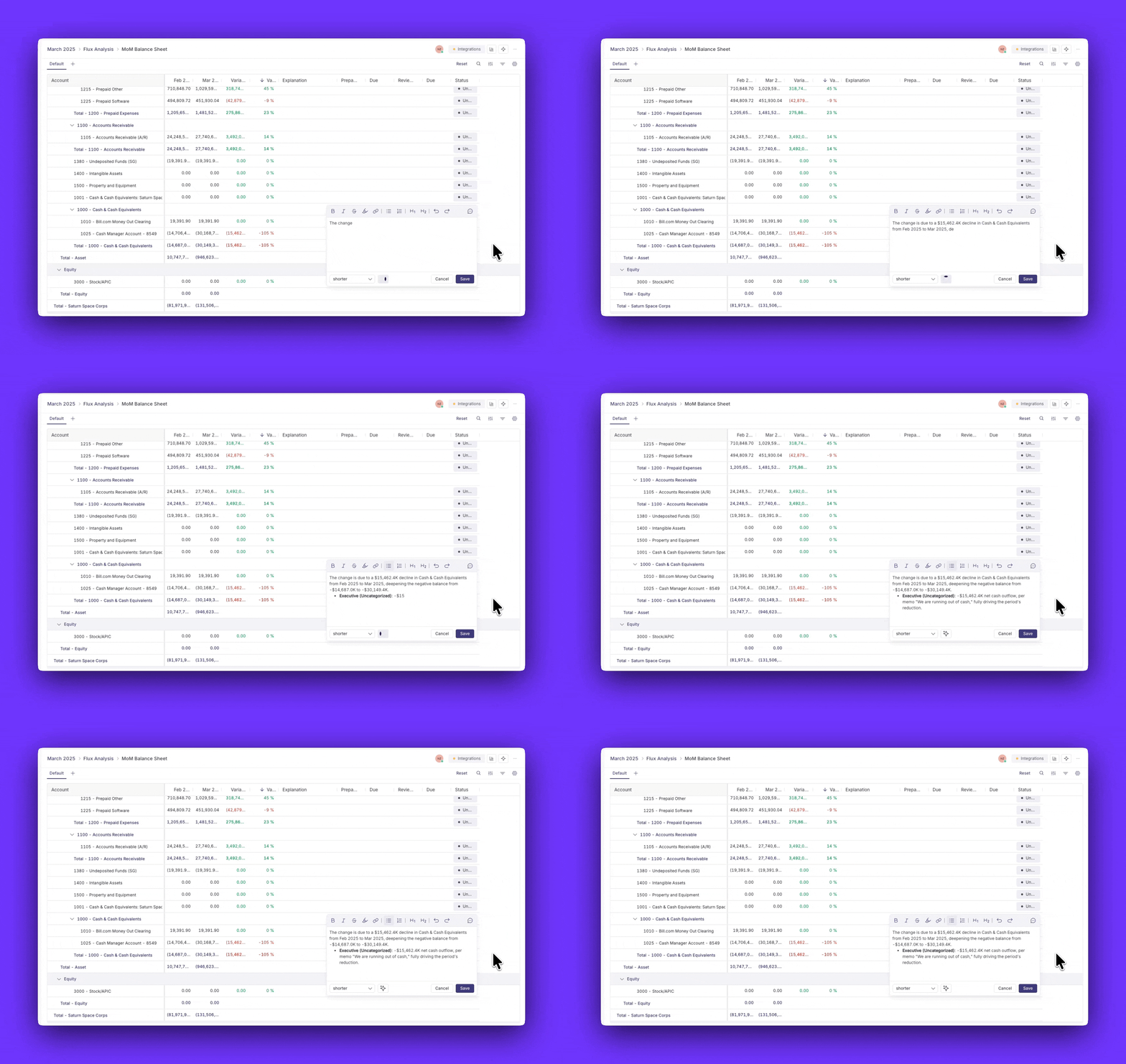
The payoff of one live-data platform is straightforward: teams spend less time chasing numbers and more time reviewing them. Brex saw it after switching to Numeric, cutting its close from six days to four. As Sr. Accountant Kyle Gillingwater put it, "What took us days now only takes us a few hours." Pricing is public across three tiers (Starter, Growth, Enterprise), and most teams are live within the first month.
BlackLine
BlackLine sits at the enterprise end of the market. It's built for large, often public companies running high-volume transaction matching, intercompany, and consolidation, with mature compliance tooling. That depth comes with weight: implementations average six or more months and typically require a dedicated administrator, and BlackLine is generally more expensive than FloQast and most alternatives. Reviewers on G2 (where it rates around 4.5 out of 5) also note that ERP syncs can lag by up to a day. For enterprises with the resources to run it, that trade-off can be worth it; for leaner mid-market teams it's often more platform than the close requires.
Comparing FloQast, Numeric, and BlackLine
The Bottom Line on FloQast
FloQast is a solid, well-liked choice for a specific profile: a Controller or mid-market accounting team that wants to bring order and audit readiness to a checklist-led close without leaving the spreadsheets they already trust. If that's your team, its organization, ease of adoption, and support are real strengths.
Teams tend to look elsewhere when they outgrow balance-level data, once chasing discrepancies back into the ERP, exporting flux to Excel, or wanting AI and automation woven through the close start to cost real time each month. That's usually the point at which a transaction-level platform like Numeric, or an enterprise system like BlackLine, enters the conversation.
The best next step is to match the tool to how your team actually closes: the size of your team, your ERP, and how much you want the software to do versus track. If you're comparing options, our guide to the best financial close software lays them out side by side.
Frequently Asked Questions
Related Content
.png)
Billing and Revenue Management: A Guide for SaaS Finance Teams
Billing and revenue management keeps invoices and ASC 606 revenue tied to one contract. See how contract changes affect both and how to evaluate a solution.
.png)
The 9 Best Usage-Based Billing Software Tools for Accounting Teams
Compare the 9 best usage-based billing software tools on pricing, ERP fit, and ASC 606 revenue recognition, starting with Numeric's Billing and Revenue.
.png)
Automated ASC 842: From Lease PDF to Audit-Ready Schedule
How to automate ASC 842 lease accounting, from extracting lease terms to the ROU asset, lease liability, and journal entries your auditors can trace.