General Ledger Reconciliation: How to Skip the Month-End Scramble

.webp)
It is the last day of the close, and one account refuses to cooperate. Your books show the cash balance as one number; the bank statement shows another. Somewhere in a month's worth of transactions is the single entry pulling them apart, and until you track it down, nothing downstream can be trusted. If you have ever been there, you already understand why this work matters, even if no one has handed you a formal name for it.
That name is general ledger reconciliation, and the stakes add up fast. APQC's benchmarking survey of 2,300 organizations found that the median finance team takes 6.4 days to close its books each month, with the slowest quartile taking 10 days or more. Reconciliations are one of the biggest reasons the clock runs long.
In this guide, you will learn what general ledger reconciliation is, how the process works step by step, the errors that trip teams up most often, and how teams on Numeric's ERP replacement, the Financial Data Platform, trade the month-end scramble for continuous monitoring.
Key Takeaways
- General ledger reconciliation confirms that the balances in your GL match supporting records such as bank statements, subledgers, and workpapers, ensuring your financial statements remain accurate and audit-ready.
- You do not reconcile every account. Most teams focus on high-risk, high-volume accounts such as cash, accounts receivable, accounts payable, deferred revenue, and payroll, and reconcile them monthly as part of the close.
- The core process is six steps: identify the accounts, gather supporting details, compare balances, investigate discrepancies, post adjusting entries, and retain documentation.
- The most common errors are missing or mislabeled transactions, duplicate entries, and incorrect coding, all of which compound if you do not catch them early.
- Automation removes much of the manual matching and investigation, which is why faster-closing teams increasingly reconcile continuously rather than scrambling at month-end.
- Numeric's Financial Data Platform, an ERP replacement built on data-centric accounting, shifts reconciliation from a month-end task to continuous monitoring, because there is no separate copy to tie your transactions back to.
What Is General Ledger Reconciliation?
General ledger reconciliation is a key accounting process that verifies the accuracy of the balances in your general ledger and their alignment with external documents and workpapers. In doing so, you ensure that your financial records are correct and reliable.
So what does that process look like? In practice, you reconcile your general ledger (GL) by performing account reconciliation on the accounts listed across the ledger. You will rarely reconcile every GL account; instead, you focus on key accounts, such as those that appear on a balance sheet or P&L statement.
What Are the Main Categories of General Ledger Accounts?
General ledger accounts fall into five main categories, and each plays a distinct role in capturing a different aspect of your company's financial activity.
| Category | Common Accounts |
|---|---|
Assets |
Cash, Accounts Receivable, Inventory, Fixed Assets |
Liabilities |
Accounts Payable, Notes Payable, Accrued Expenses, Customer Deposits |
Equity |
Common Stock, Retained Earnings, Preferred Stock, Treasury Stock |
Expenses |
Rent, Salaries and Wages, Utilities, Advertising and Marketing |
Revenue/Income |
Sales Revenue, Service Revenue, Interest Income, Rental Income |
Are General Ledger Reconciliation and Balance Sheet Reconciliation the Same?
It is a classic case of the "Is every rectangle a square?" question. In this instance, GL recs are the rectangle; balance sheet recs are the square.
Reconciling an account on the general ledger may also improve the balance sheet reconciliation process. However, the balance sheet generally concerns only the equity, liabilities, and asset accounts.
So, for example, conducting accounts receivable reconciliation is a necessary part of any general ledger and balance sheet reconciliation. But expense and revenue accounts only appear on the general ledger, so reconciling those accounts has no bearing on the balance sheet.
Stated simply, any account in a balance sheet reconciliation fits under the umbrella of general ledger reconciliations. Not every account in general ledger reconciliations is part of balance sheet reconciliations.
What Are Common Types of General Ledger Reconciliations?
Understanding common examples helps you grasp the practical applications. Here are some key types:
| Reconciliation Type | What It Matches |
|---|---|
| Fixed asset reconciliation | GL trial balance against fixed asset subledger totals |
| Accounts payable reconciliation | AP ledger trial balance against your AP aging report |
| Accounts receivable reconciliation | AR ledger balance against unpaid sales invoices |
| Bank reconciliation | Cash account ledger balances against bank statements (see cash management) |
These examples highlight the importance of regular reconciliation across various aspects of financial management, a fundamental step for ensuring that every transaction is accurately recorded and verified.
How Subledgers Roll Up Into the General Ledger
Most of the work in GL reconciliation happens one level down, in your subledgers. A subledger holds the transaction-level detail behind a single control account in the general ledger: your accounts receivable subledger tracks every open invoice by customer, your accounts payable subledger every bill by vendor, and your fixed asset subledger every asset and its accumulated depreciation. The GL carries the summarized balance; the subledger carries the line items that add up to it.
Reconciling the two means confirming that the subledger detail still sums to the control-account balance in the GL. When they agree, the account ties out. When they do not, the subledger is where you find the missing, duplicated, or miscoded entry, pulling them apart, which is why most reconciliation work starts there. The most common subledger-to-GL reconciliations are accounts receivable, accounts payable, fixed assets (including accumulated depreciation), and inventory, each matching its subledger detail back to the control account in the GL.
Automate account reconciliation with Numeric
.png)
How Often Should You Perform General Ledger Reconciliation?
Most teams fold GL reconciliations into the month-end close. Start with your core accounts, then reconcile a growing share each month as your company matures, building toward fuller coverage ahead of audits. A common approach is to reconcile the majority of your material accounts monthly, then complete fuller reconciliations during the audit cycle.
Why Is General Ledger Reconciliation Important?
General ledger reconciliation is an internal control that is essential for maintaining accurate, reliable, and fraud-free financial records, which, in turn, support effective P&L management.
Here are the core reasons to reconcile your GL:
- Ensures completeness and accuracy of account balances. Reconciliation confirms that all transactions are accurately recorded. If you buy inventory worth $1,000, that transaction should appear in both your general ledger and the supporting register for inventory transactions. Reconciliation ensures these amounts match, catching discrepancies immediately. Without this step, unnoticed errors could lead to incorrect account balances.
- Helps you prepare reliable financial statements. Financial statements, such as balance sheets and income statements, depend on accurate general ledger data. Imagine preparing an income statement without first verifying your revenues and expenses. Inaccuracies mislead stakeholders, while regular reconciliation ensures your statements reflect your business's true financial position.
- Gives leadership confidence before the numbers leave the room. Most accounting teams spend at least some time fielding last-minute questions from their CFO or FP&A team before a close is signed off. Reconciling regularly means those conversations are shorter, because the numbers already have a verified trail behind them.
- Prevents errors and identifies fraud. Errors can arise from simple mistakes, such as entering the wrong amount, or from more serious issues, such as fraud. General ledger reconciliation catches these early.
- Maintains the integrity of the general ledger. The general ledger is the backbone of your financial records, since every transaction flows through it. Ensuring its accuracy is critical for maintaining trust and integrity in your financial data.
The Six Traditional Steps of the General Ledger Reconciliation Process
Step 1: Identify the Accounts to Be Reconciled
Begin by pinpointing the specific accounts that need reconciliation, and prioritize accounts with high transaction volumes or those crucial for financial statements. Identifying them ensures you cover all critical areas where discrepancies might occur. Often, you start with core accounts such as cash, deferred revenue, payroll, and AR/AP.
Step 2: Gather Necessary Details From Transaction Sources
Collect all relevant documents. This includes bank statements, workpapers, or downloaded reports you will use to substantiate the recon. Make sure you have access to any subledger information associated with your general ledger accounts.
Having accurate, comprehensive records helps you cross-verify transactions and balances. Without these documents, reconciliation becomes guesswork, leading to potential errors.
Step 3: Compare the Information
With all documents in hand, the next step is comparison: compare the total from your general ledger with the supporting documents.

If the totals in your workpapers tie out with the GL, then you can assume that the corresponding account is balanced. If not, you’ll have to look for any mismatches between the ledger entries and the supporting sources.
Step 4: Investigate Discrepancies
Dive deeper into any discrepancies you find. Look into your own accounting processes to identify procedural errors. Determine whether they are due to timing differences, data entry errors, or potential fraud.
If you use Numeric, it pulls in the underlying transaction details so you can locate missing or erroneous entries without exporting reports.
Not every discrepancy is an error. A deposit in transit or an outstanding check is simply a timing difference that will clear on its own, while a duplicated or miscoded entry needs an adjusting entry to fix.
Sorting one from the other is the heart of the investigation. Once you know which is which, decide on the steps needed to correct the true errors, whether through further verification or adjustments.
Step 5: Prepare and Post Adjusting Journal Entries
If corrections are needed, prepare journal entries to adjust the account balances. For instance, if a transaction was recorded twice, an adjusting entry will remove one of the entries. Post these adjustments so the general ledger reflects accurate balances. For a full breakdown of how to prepare and post journal entries correctly, see our GL posting guide.
Step 6: Retain Documentation for Future Reference
Maintain all documentation related to the reconciliation process. This includes the original transaction records, notes on discrepancies, and copies of adjusting journal entries.
Documenting your reconciliation is vital for future reference and audits. Keep a clear audit trail of who prepared and reviewed each reconciliation, the comments raised, and the adjustments made. It provides transparency and accountability across your financial reporting.
Common Errors in General Ledger Reconciliation
Even with the most thorough procedures, errors can still occur. Understanding these common mistakes helps you avoid them and keep your financial records accurate.
1. Unchecked, Missing, or Mislabeled Transactions
Discrepancies in accounting are like seeds for future frustration. If you do not stop them at the root, they grow into massive headaches down the road. Timeliness is crucial for catching errors early and keeping your financial data up to date. The longer a missing or miscoded transaction sits unnoticed, the more work it takes to unwind after the fact.
2. Duplicate Entries
Duplicate entries often result from poor coordination among team members or automated systems. To reduce confusion, add a human in the loop for workflows like automated bank matching, so someone can review outputs for duplicates. Similarly, delegate tasks clearly across your team to avoid overlapping duties.
3. Incorrect Coding
Coding a transaction for AR instead of AP is an easy recipe for a reconciliation mess. You have allocated money owed to money earned. These errors throw off account balances and require adjusting entries across multiple accounts in the GL.
Faulty coding is typically attributed to a lack of proper training or to a complex chart of accounts, both of which increase the likelihood of errors. To prevent coding mistakes, provide thorough training to staff accountants and keep your account structure as simple as possible.
By staying aware of these common errors, you can put strategies in place to avoid them and keep your records reliable.
Why You Should Automate General Ledger Reconciliation
Getting your balances to tie out is genuinely gratifying. Not only have you found the needle in the haystack, but you have also confirmed that your company is free from fraud or missing transactions.
That description only paints reconciliation with the rosiest of glasses. For many accountants, reconciling GL accounts is a painstaking exercise, one that takes hours to identify the transactions keeping dozens or more accounts out of balance.
Automated general ledger reconciliation takes much of that weight off. With account reconciliation software, you can streamline the process because automation simplifies these steps:
- Data gathering. Manually, this is the hour each month you lose to exporting bank statements, pulling subledger reports, and dropping trial balances into a workbook before you can even start. Automation consolidates everything into one place the moment the period opens.
- Automatic certification. Instead of signing off on every account by hand, you auto-submit the reconciliations that already tie out or sit below your materiality threshold, and spend your attention on the handful that do not.
- Discrepancy identification. The painful part of a rec is scanning hundreds of lines for the one entry that broke it. Automated matching clears everything that ties out and surfaces the exact transaction that does not, so you investigate instead of hunting.
- Consistent documentation. No more piecing together the story of a reconciliation months later for an auditor. Every supporting document, comment, and adjustment is stored and organized as you go, ready to hand over.
- Enhanced collaboration. Rather than emailing workbooks back and forth and wondering which version is current, your whole team works from the same live data, with clear ownership over who prepared and reviewed each account. For senior accountants, that shift frees up time for the judgment calls and team oversight that actually move the close forward.
If you want to compare options, here is a closer look at reconciliation software and how to evaluate it.
Skip the Scramble: GL Reconciliation on Numeric's Financial Data Platform
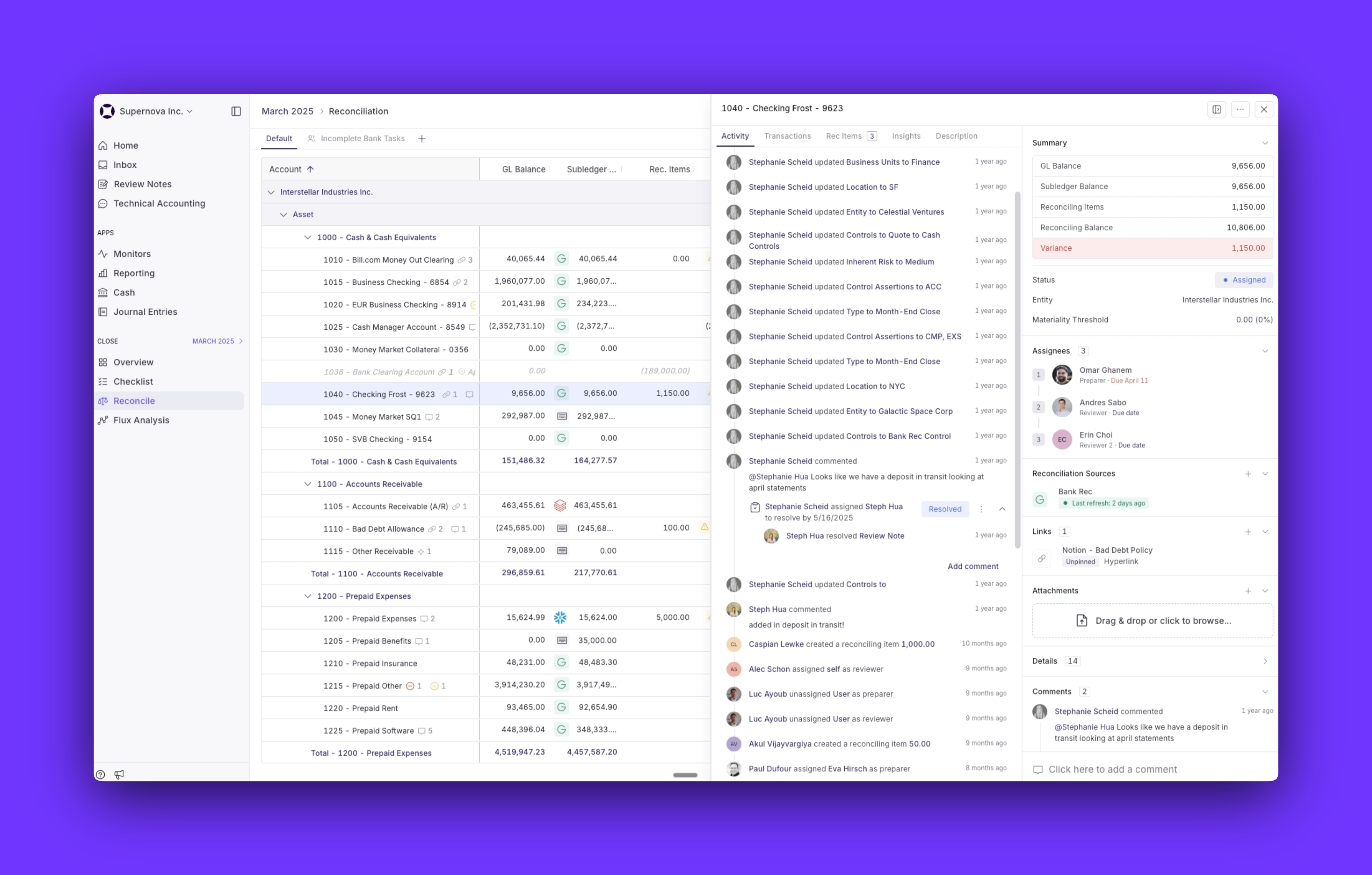
Numeric's Financial Data Platform (FDP) changes what those six steps look like. It's an ERP replacement built on data-centric accounting, so there's no separate copy to tie your transactions back to. Reconciliation shifts from a month-end task to continuous monitoring, and your team spends its time on the exceptions that need judgment.
That shift changes both what reconciliation looks like and what it asks of the person doing it.
- Only the exceptions reach your team. Your policies run as rules, so the system clears the routine matches and your team reviews only the cases that need human judgment. When a transaction can't be matched to its source, it shows up as a flagged exception right away, long before it would surface at close.
- Full traceability instead of reconstruction. Every number drills back to the object that produced it. When an auditor or your CFO asks how a balance was reached, you click through to the actual invoice, bill, or contract, instead of piecing together the trail from workpapers and old emails.
- Continuous monitoring instead of a month-end scramble. Because balances are derived as activity happens, discrepancies surface in real time instead of accumulating until close, the core idea behind continuous accounting.
- One platform, queried directly. With Numeric's MCP, you can query the FDP straight from your AI client, cross-referencing balances against external files or triggering follow-up work, without exporting anything or waiting on a report to get built.
.svg)
What Changes for the Accountant
You’ll spend less time proving two records agree, more time on real judgment calls. Some edge cases still need a person to weigh in, but that time no longer competes with hunting down routine mismatches. Instead of investigating why an account doesn't tie out, the work becomes reviewing the handful of things the system already flagged, and less of the day goes to re-entering and re-verifying what's already correct.
If you're staying on your current ERP, Numeric's Close & Analytics runs your GL reconciliations right on top of it.
General Ledger Reconciliation: The Bottom Line
Reconciling the general ledger is like being told to eat your vegetables. You may not want to, but you always know it is in your best interest. By regularly performing these reconciliations, you maintain reliable, audit-ready financial data and keep it aligned with your business goals.
With Numeric's Financial Data Platform, there's no separate copy to tie your transactions back to, so reconciliation becomes continuous monitoring instead of a month-end scramble, and every number is tied to its source for your auditors and CFO. Schedule a demo to see how it works.
Frequently Asked Questions (FAQs)
Related Content
.png)
Numeric vs. Maxima: Which AI Close Platform Fits Your Team?
Numeric and Maxima both automate close work. Compare how each handles reconciliations and cash matching, who owns the rules, and when each one fits.
.png)
7 NetSuite Reporting Tools, and When to Just Replace NetSuite
Compare 7 NetSuite reporting tools by use case and cost, and learn when replacing NetSuite solves reporting problems at the source.
.png)
What Is Multidimensional Accounting? Benefits, Examples, and 3 Steps to Set It Up
Learn how multidimensional accounting tags transactions by department, product, and customer, with examples and 3 steps to set it up.