Accounting Journal Entries: A Complete Guide for Finance Teams

.png)
The numbers on your financial statements all started as a journal entry.
That might sound obvious to anyone who's been through a close cycle or two. But "obvious" doesn't mean "easy to execute well." Journal entries are where small mistakes happen. A miscoded account, forgotten accrual, or an unreviewed recurring entry that outlived its original purpose can compound into audit findings, restated financials, and very long nights during close.
Most guides treat journal entries as a textbook exercise, aiming to debit this, credit that, move on. This one doesn't.
We've got a practical, operational guide covering how to record entries correctly, which type to use and when, how to build controls around recurring entries, and how journal entries fit into the broader close process.
Whether you're a staff accountant building confidence in the fundamentals or a Controller looking to tighten your team's processes, this guide is built to be actually useful, so let's get started.
What Are Accounting Journal Entries?
A journal entry is the first and most granular record of every financial event that hits your books. Before anything flows to the general ledger, the trial balance, or the financial statements, it starts as a journal entry.
The Role of Journal Entries in the Accounting Cycle
A journal entry is a formal record of a financial transaction that captures the date, the accounts affected, debit and credit amounts, and a description of the business purpose. Operationally, it's the foundational input for everything that follows in the record to report cycle.
The chain looks like this:
- Journal entries feed the general ledger: They're the first record of every financial event, and the starting point for everything that follows.
- The general ledger feeds the trial balance: The account balances accumulate here before they're tested for accuracy.
- The trial balance feeds the financial statements: This is the final output that leadership, auditors, and investors rely on.
Critically, journal entries also create the audit trail that regulators, auditors, and internal stakeholders rely on to verify that financial statements are materially accurate.
When an auditor samples transactions, they're tracing back to journal entries. A clean entry with proper documentation closes the loop, while a vague or unsupported one opens the door to a potentially long and complicated process.
The Double-Entry System and Why It Matters
Every journal entry touches at least two accounts. One gets debited, one gets credited, and the accounting equation (Assets = Liabilities + Equity) stays in balance. This is the double-entry system, and it functions as a built-in check on accuracy. If an entry doesn't balance, something is wrong before it ever hits the ledger.
Here's how debits and credits work across each account type:
A useful mnemonic is DEAD CLIC:
- Debits increase Expenses, Assets, and Dividends
- Credits increase Liabilities, Income, and Capital.
But if you understand the logic — assets are what you own, increases are positive, and debits drive increases on the asset side — you'll apply it correctly even in edge cases where a mnemonic device might otherwise fail you.
Anatomy of a Journal Entry: Essential Components
Consistent, complete formatting separates audit-ready books from a cleanup project waiting to happen. Here's what a properly formatted journal entry must include.
The Five Required Elements
Five fields are required on every journal entry:
- Transaction date: The date the economic event occurred (which is not necessarily the date of entry). This determines the accounting period.
- Account names: The specific general ledger accounts being debited and credited. Debits are listed first; credits are indented below.
- Debit and credit amounts: Monetary values that must balance. If they don't, the entry should not post.
- Description / narration: A concise, specific explanation of the business purpose. "Accrue March consulting fees per SOW #1042" is useful. "Consulting expense" is not. Good descriptions reduce review time and strengthen audit documentation.
- Reference number: A unique identifier for tracking, cross-referencing to source documents, and maintaining the audit trail.
Source Documentation: What It Is and Why It Matters
Every journal entry should be supported by source documents. These may include:
- Invoices
- Contracts
- Payroll registers
- Bank statements
- Amortization schedules
- Management calculations
Unsupported entries are one of the most common audit findings, and a top red flag for fraud risk. When auditors sample journal entries, they're looking for documentation that substantiates the entry.
As a best practice, attach or link supporting documents directly to the entry in your accounting system or close management platform. The goal is that anyone reviewing the entry — including a new team member or an external auditor — can find everything they need without asking for more information.
Consider a close automation tool to help maintain your audit trail. Numeric's Close Checklist helps teams centralize tasks, templates, and supporting documentation so the process is clear, coordinated, and audit-ready from the start.
How to Record a Journal Entry Step by Step
Here's the end-to-end process for recording a journal entry, from analyzing the transaction to posting and verifying. As an example, your company accrues $12,000 in employee bonuses that were earned in March but not yet paid.
Step 1: Gather and Verify Supporting Documents
Before anything gets recorded, make sure you have documentation that substantiates the transaction.
For a bonus accrual, that means the approval from HR or management confirming the amount has been authorized and earned through March 31. Remember, without documentation, there can't be an entry — if you can't explain why it's being recorded, that's a signal to pause.
Step 2: Identify the Transaction and Affected Accounts
What actually happened? Map the economic event to the accounts it affects.
In our example, the company has incurred a bonus expense it hasn't yet paid, so we're looking at an expense account (Bonus Expense) and a liability account (Accrued Liabilities). Identifying the accounts correctly is where most errors happen for newer preparers.
Step 3: Determine Debits and Credits
With the accounts identified, apply normal balances to determine which side each one hits. The Bonus Expense is an expense account, so it increases with a debit. Accrued Liabilities is a liability, meaning it increases with a credit.
Both amounts are $12,000, so the entry balances.
Step 4: Record the Entry
Enter the transaction in your accounting system or close management platform.
If you're using a platform that supports journal entry creation directly, you can record and queue entries for review without manual ERP entry. You can also view posted JEs tied to specific close tasks, pulled directly from NetSuite, via Numeric's journal entry features. And with Numeric's MCP, you can write and post journal entries directly from the AI tools your team already uses.
Step 5: Post to the General Ledger and Verify
Once reviewed and approved, the entry posts to the general ledger and account balances update in real time.
There are two things worth confirming at this stage: That the trial balance still ties, and that the entry landed in the correct period. A posting that slips into the wrong period can distort two months of reporting.
Our Example
Let's say a company needs to accrue $12,000 in employee bonuses earned in March but not yet paid. Here's how that entry looks:
Missing this entry has real downstream consequences:
- Bonus Expense is understated on the income statement, which overstates profitability.
- Accrued Liabilities is understated on the balance sheet, which misrepresents what the company owes.
- One missed accrual means you could end up with two distorted statements.
Types of Journal Entries (and When to Use Each)
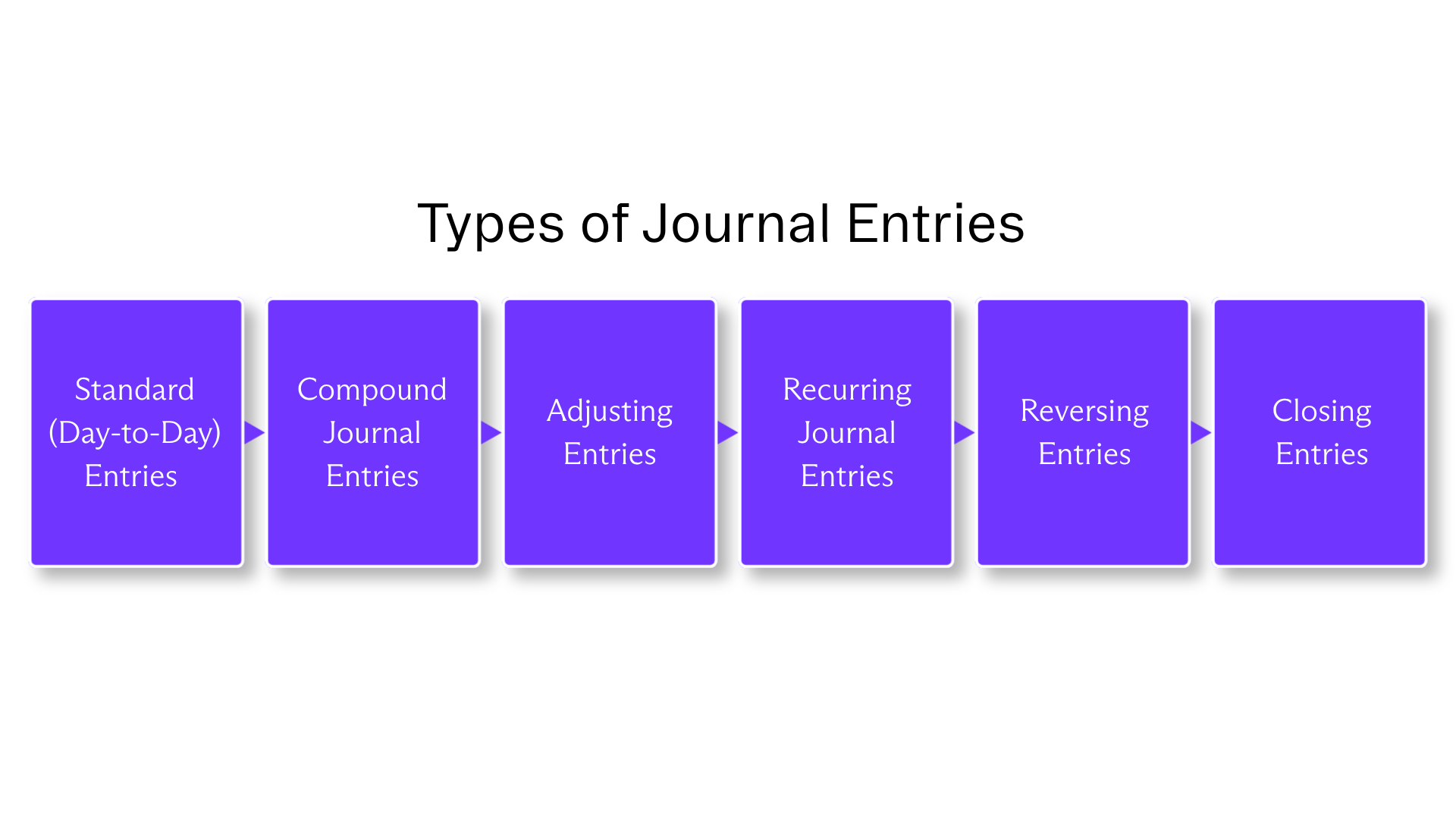
Not all journal entries serve the same purpose. Here's a breakdown of the six main types and when each is appropriate.
Standard (Day-to-Day) Entries
Standard entries record routine business transactions as they occur. Examples include a cash sale, a vendor invoice getting paid, a customer payment coming in.
They're the most common entries your team will make, and typically the most straightforward. You identify the accounts, apply normal balances, record, and post.
Compound Journal Entries
A compound entry touches more than two accounts in a single transaction. Payroll is the classic example, as wages payable, employer taxes, benefits contributions, and net pay all need to land in a single balanced entry. Asset purchases with a trade-in work the same way, as do loan payments that split between principal and interest.
The balancing rule still applies: total debits must equal total credits. Where compound entries tend to go wrong is in the narration, with a vague description on a multi-account entry creating review friction and audit exposure.
Adjusting Entries
Adjusting entries are made at period-end to ensure revenues and expenses land in the right period under accrual accounting, consistent with the matching principle. They don't record new transactions; they correct the timing of ones that have already occurred. The four main categories are:
- Accrued expenses: Costs incurred but not yet recorded. The expense is real; the invoice just hasn't arrived.
- Accrued revenues: Revenue earned but not yet billed. These are common in professional services or SaaS with usage-based billing.
- Deferred revenues: Cash received before delivery. The obligation still exists, so recognition has to wait.
- Prepaid expenses: Cash paid in advance for something not yet consumed, such as insurance, annual software subscriptions, prepaid rent.
Recurring Journal Entries
Recurring entries repeat on a predictable schedule. They feature the same accounts, same or formulaic amounts, and the same timing each period. Depreciation, rent, prepaid amortization, and standard accruals are the most common examples.
These are strong candidates for automation, but automation doesn't remove the need for review. Amounts change, contracts end, and policies get updated. An unreviewed recurring entry can quietly post the wrong number for months before anyone catches it. More on that in the controls section below.
Reversing Entries
Reversing entries are posted at the start of a new period to cancel out an accrual from the prior period. They're most useful when an actual invoice or payment will hit the same account in the new period and you want to avoid recognizing the expense twice.
Let's say you accrue $5,000 in consulting fees on December 31. The invoice arrives in January and gets coded to the same expense account. Without a reversing entry, that expense is recognized twice. The reversing entry on January 1 eliminates the original accrual, so when the invoice posts, the net result is correct.
One clarification worth making is that reversing entries aren't appropriate for deferrals or depreciation, where the original entry should stand.
Closing Entries
Closing entries zero out temporary accounts — revenues, expenses, and dividends — at period-end so they don't bleed into the next period. The four standard steps involved are:
- Close revenue accounts to Income Summary
- Close expense accounts to Income Summary
- Close Income Summary to Retained Earnings
- Close Dividends to Retained Earnings
Most modern ERPs automate this process. Controllers should still verify that it ran correctly and that retained earnings rolled forward as expected.
Choosing the Right Entry Type
The entry type determines how the transaction gets treated in the accounting cycle. When you're not sure which one applies, work through these questions:
- Is this a routine transaction happening now? Standard entry, and record it as it occurs and move on.
- Does it affect more than two accounts? Compound entry, so capture everything in a single balanced entry rather than splitting it across multiple.
- Is this an end-of-period adjustment to match revenue or expense to the right period? Adjusting entry — this is what keeps accrual accounting honest.
- Does this entry repeat on the same accounts with a similar amount each period? Recurring entry, and is a candidate for automation, with the right controls in place.
- Did you make an accrual last period that an actual invoice or payment will replace this period? Reversing entry, so flip the accrual at the start of the new period to avoid double-counting.
- Is it period-end and time to reset temporary accounts? Closing entry, which means you should zero out revenues, expenses, and dividends before the next period opens.

Recurring Journal Entries: Setup, Controls, and Best Practices
"Set it and forget it" isn't a complete journal entry strategy (as much as many of us wish it was). Recurring entries are efficient, but only when paired with the right controls.
When to Automate a Recurring Entry
Not every recurring entry is a good automation candidate. The ones that are tend to share the following traits:
- The transaction repeats at a predictable cadence.
- The accounts are the same each period.
- The amount is fixed or calculable by formula.
- The entry doesn't require significant judgment.
Importantly, if the entry requires judgment — such as estimating an amount, reassessing whether an accrual still applies, or accounting for a policy that may have changed — it should stay manual, even if it repeats on a regular cadence.
Setting Up Recurring Entries
Good setup documentation is what separates a recurring entry that runs cleanly for two years from one that causes problems six months in.
At minimum, define the frequency, start date, and — critically — an expiration or review date. Open-ended recurring entries with no defined end date are one of the most common sources of stale postings.
Beyond that, document the accounts, the amount or formula, a description template, and references to supporting documentation. If the amount is formula-driven, document the formula and its inputs so the next reviewer isn't guessing.
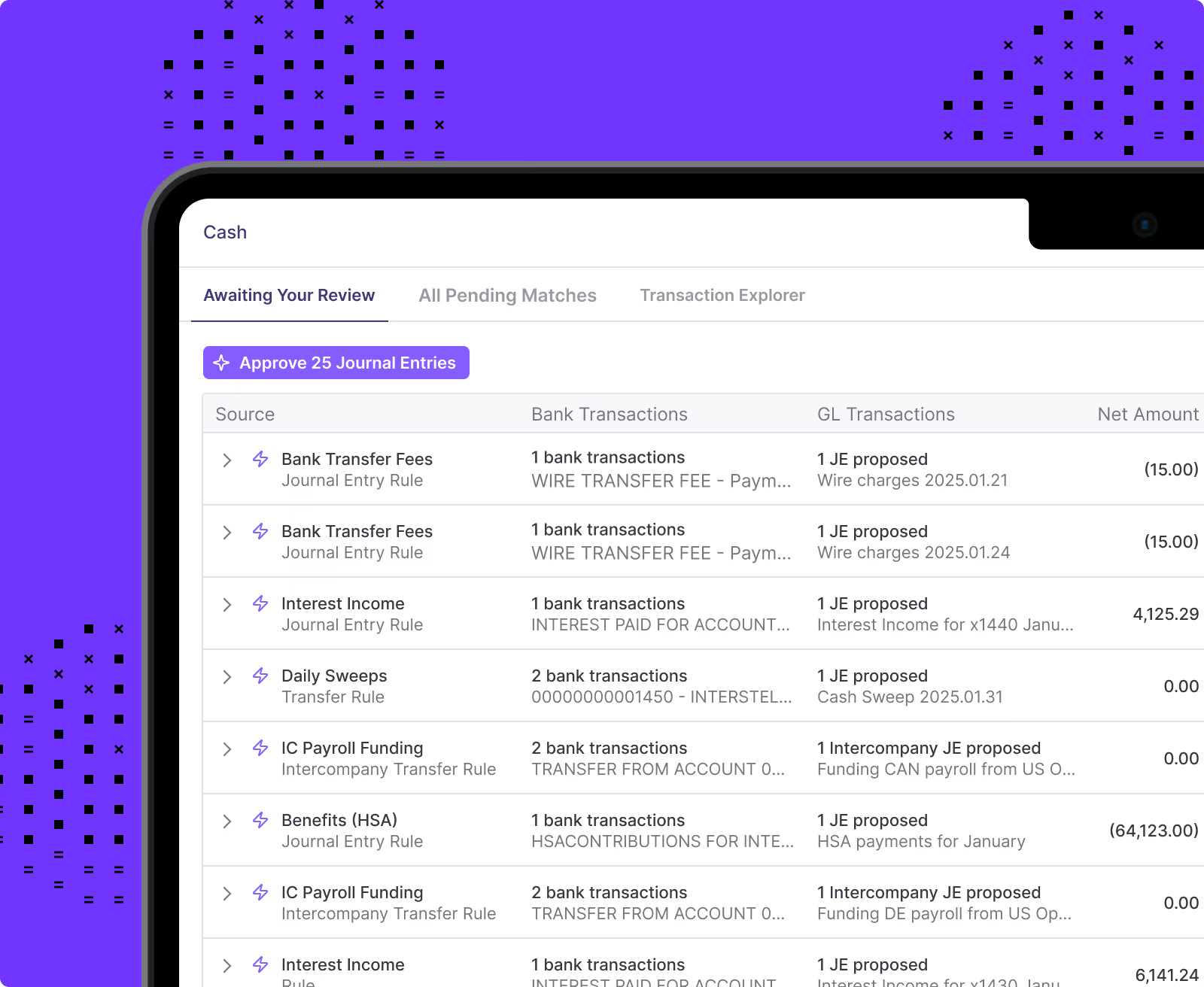
For teams on NetSuite, Numeric's Journal Entry Automation lets you schedule and post entries in batches automatically, with posted JEs tied directly to the close tasks they belong to.
Review, Approval, and Validation Controls
At minimum, establish a quarterly review cadence for all active recurring entries. Require approval before any recurring entry is created, modified, or deactivated — and define a clear approval matrix: who can create, who reviews, who approves.
Each period, validate against source data. If a recurring entry amortizes a prepaid insurance policy, confirm the policy hasn't been renewed, cancelled, or changed in amount. If a recurring entry accrues a vendor fee, verify that the contract is still active.
Finally, flag any recurring entry that has been posted for more than 12 months without a formal review. Length of service is not evidence of accuracy.
The Risks of Unmanaged Recurring Entries
The consequences range from minor cleanup to a restatement conversation, and they tend to compound the longer they go unnoticed.
Stale entries are the most common culprit. A recurring entry for a vendor contract that ended six months ago can keep posting quietly, overstating expenses every month until someone notices.
Compounding errors can be headache-inducing. An incorrect amount that posts for a full quarter before anyone catches it means you need to correct multiple entries. And, depending on materiality, it could mean a conversation you'd rather not have with your auditors.
Audit exposure is the third risk. Auditors regularly test recurring entries for appropriateness, and entries without supporting documentation or evidence of periodic review are a frequent finding.
How Journal Entries Connect to the Close
Journal entries are essential to the entire close process. Understanding the connections helps Controllers and their teams identify where problems start before they become month-end close surprises.
Here are a few things to keep in mind:
- Standard entries are created throughout the month, while adjusting, accrual, and closing entries are concentrated at period-end.
- Each journal entry should be tied to a specific close task with a clear owner, due date, and reviewer.
- Orphaned entries — which are entries that exist in the system with no corresponding task or ownership — are a recurring source of missed items and review gaps.
Journal entries affect at least two general ledger accounts, which means they directly impact the trial balance and, ultimately, the financial statements. A missed accrual entry understates both expenses on the income statement and liabilities on the balance sheet, which can distort profitability metrics and working capital ratios in the same stroke.
Reconciliations are the check on journal entries. They verify that GL balances agree with supporting schedules, subledgers, and external records. If a reconciliation doesn't tie, it often points back to a missing, duplicated, or incorrectly recorded journal entry.
Running reconciliations close to period-end — before closing entries — gives the team time to investigate and correct without last-minute fire drills. Accounting is an industry where late surprises are not acceptable and catching a discrepancy before review is far less costly than finding it after.
Automating Journal Entries: From Manual Work to Controlled Efficiency
Not every journal entry should be automated, but the right ones definitely should be. Here's how to think about it.
Recurring entries with fixed amounts and predictable schedules (rent, depreciation, and standard accruals) are the clearest candidates. The accounts are known, the amounts don't require judgment, and the risk of a wrong entry is low, especially with a review process in place.
Subledger-generated entries such as AP, AR, and payroll are often already automated through ERP workflows. The Controller's job here is to verify the account mapping and review exception reports, not to recreate what the system already does.
Complex entries that require significant judgment, non-standard calculations, or estimates should stay manual. Automation reduces repetitive work; accountant judgment on complex transactions remains essential.
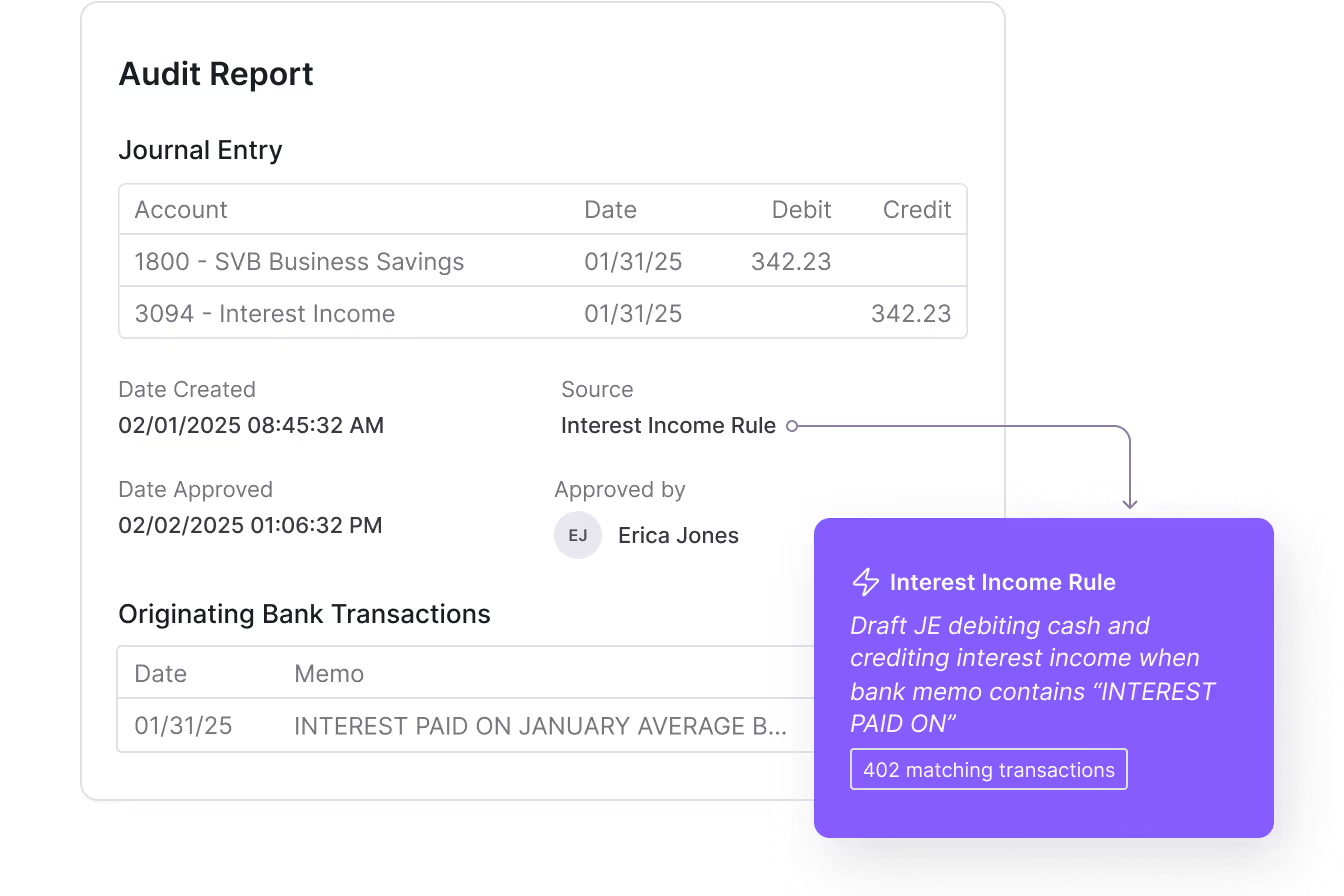
For teams on NetSuite, Numeric's Journal Entry Automation lets teams automatically post journal entries in batches, link JEs to close tasks, and view posted entries directly without leaving the platform. It's designed to cut the manual overhead of recurring entry management while maintaining the visibility and control teams need.
Advanced Journal Entry Scenarios
Beyond everyday transactions, accounting teams encounter complex scenarios that require deeper judgment and involvement from senior accountants and Controllers.
Intercompany Journal Entries
Intercompany entries record transactions between entities within the same corporate group, including management fees, shared services allocations, and intercompany loans.
These entries must be recorded on both sides of the transaction and eliminated during consolidation. Mismatches between entities are a common source of consolidation errors.
For a streamlined process with minimal error risk, use standardized intercompany account codes and reconcile intercompany balances monthly before consolidation. Mismatches discovered at consolidation are significantly more expensive to resolve than mismatches caught during the close.
Foreign Currency Entries
Transactions in foreign currencies must be recorded at the exchange rate on the transaction date. At period-end, monetary balances are remeasured at the closing rate, with the resulting gains or losses recognized in the income statement.
Controllers should establish a consistent, documented source for exchange rates and attach those rates to the relevant entries.
Revenue Recognition Accruals (ASC 606)
Revenue recognition under ASC 606 may require entries to defer revenue, recognize revenue over time, or capitalize and amortize contract costs. The specifics depend on contract structure and performance obligations, so check the policy to see what's applicable to you. For the full mechanics, including the five-step model, deferred revenue, and contract modifications, see our guide to revenue recognition for SaaS.
Lease Accounting Entries (ASC 842)
Under ASC 842, operating and finance leases require initial recognition of a right-of-use (ROU) asset and a corresponding lease liability, followed by periodic amortization and interest entries.
These entries are often complex and benefit from amortization schedule templates that calculate monthly amounts automatically and serve as supporting documentation.
Error Corrections
Errors happen. It's inevitable. The question is how to correct them cleanly.
For errors discovered before period close, a correcting entry is straightforward. You reverse the incorrect entry and post the correct one. For errors discovered after period close, however, the approach depends on materiality and timing.
Ultimately, one of the best ways to catch errors before they require a correction is running reconciliations throughout the close instead of waiting until the end. Numeric's Reconcile pulls trial balance and supporting source data in real time, surfacing discrepancies as they occur, so a missing or incorrect journal entry gets flagged while there's still time to fix it cleanly.
The Bottom Line
Journal entries are the foundation of the financial statements, audits, and business decisions that follow from them. The basics matter, but the execution at scale is where accounting teams earn their credibility.
The progression looks like this:
- Start with the fundamentals: Understand what a journal entry is, how debits and credits work, and what makes an entry complete.
- Learn which entry type fits which situation: This way, you're not reaching for an adjusting entry when a reversing entry is what the moment calls for.
- Build controls around recurring entries: These should include approval workflows, review cadences, expiration dates.
- Automate where it makes sense: Automate where you can without losing the visibility and oversight that keeps books defensible.
First and foremost, start by auditing your current journal entry process. Look for unreviewed recurring entries that have been running on autopilot, entries without supporting documentation, and manual bottlenecks that could be automated with the right tooling.
Numeric lets teams automatically post recurring journal entries to NetSuite in batches, ties every JE to a specific close task so nothing falls through the cracks, and gives Controllers full visibility into posted entries without having to dig through the ERP.
For teams on NetSuite that are ready to automate recurring journal entries, link JEs to close tasks, and maintain a complete audit trail, schedule a demo with Numeric.
FAQ
Related Content
.png)
Expense Allocation in Accounting: From Shared Costs to True Margins (and Why the Usual Methods Break)
Learn what expense allocation involves, why it's essential for fully loaded P&Ls and true margins, and why spreadsheet models and aggregate JEs keep failing, plus how to fix the root cause.
.png)
Multi-Entity Consolidation: What It Involves, Why It Breaks, and How to Fix It
Learn what multi-entity consolidation involves, why it breaks as companies grow, and why both Excel and add-on tools share a structural flaw. A guide for controllers and VPs of finance.
.png)
How to Build an AI Audit Trail for Your Accounting Workflows
A practical guide to AI audit trails for accounting: what to capture, why SOX, PCAOB, and GAAS require traceability, and how to audit AI agents and skills, not just AI features bolted onto your close software.