Reconciliation Automation In 2026: Strategy, ROI, and Implementation

.png)
For Controllers managing a growing close, reconciliation quickly becomes a control, visibility, and scalability issue. When reconciliations are slow or unreliable, everything downstream suffers: the close takes longer, reporting confidence drops, audits get more painful, and the team burns hours on work that could have been resolved weeks ago.
Reconciliation automation is meant to fix this. But the term gets thrown around loosely, and there can be a wide gap between "we automate reconciliations" on a vendor's website and what actually happens in your month-end workflow. This guide walks through how the technology works, where to start, how to build the business case, and what separates implementations that succeed from those that stall.
Why Reconciliation Automation Is A Priority In 2026
Reconciliation automation has been around for years, but the urgency behind it has changed.
Finance leaders are now dealing with a collision of faster close expectations, growing transaction volumes, tighter audit scrutiny, and teams that can't scale headcount at the same rate as complexity.
Three forces in particular are driving the conversation:
- Manual reconciliation is still a close bottleneck. Export-match-email workflows create delays, duplicate effort, and low visibility into status. The impact shows up in days to close, reviewer capacity, and reporting confidence. Meanwhile, your most experienced accountants are spending their best hours on repetitive tie-outs.
- The strategic value extends well beyond efficiency. Faster, automated bank reconciliations improve close predictability, cash visibility, and leadership confidence in the numbers. Finance leaders increasingly connect reconciliation automation to working capital visibility, faster decision-making, and a foundation for continuous accounting rather than treating it as a standalone tool.
- AI and agentic workflows are changing expectations. The 2026 conversation is increasingly about AI-assisted matching, anomaly detection, and exception routing. These are the most proven use cases, and they deliver real time savings. But real ROI still depends on disciplined implementation, data readiness, and sequencing.
How Modern Reconciliation Automation Actually Works
Before evaluating tools, it helps to understand the operating model. Modern reconciliation automation is a connected workflow that replaces the export-match-email cycle with something that actually scales.
Data Ingestion And Source Connectivity
Automated reconciliation starts with pulling data from your ERP, bank feeds, payment processors, subledgers, and supporting workpapers. This is where the first meaningful quality gap emerges between vendors.
Shallow connectivity means periodic file imports. Your team exports a trial balance, uploads a CSV, and the platform runs a comparison. Deep integration, however, means the platform pulls refreshed, transaction-level data directly from your ERP and bank systems in real time.
That distinction determines whether your team is reconciling against current data or a snapshot that's already stale.
Matching Logic And Automation Layers
Once data is flowing in, the platform matches transactions in layers.
Rule-based matching is the foundation. Your team defines conditions (amount, date range, reference number, memo text) and the system applies them automatically across one-to-one, one-to-many, and many-to-many scenarios.
AI-assisted matching builds on top of rules. The system learns from historical patterns, suggests new rules, parses inconsistent text fields, and flags potential matches a purely rules-based engine would miss.
A strong platform should auto-match the vast majority of predictable transactions and cleanly route true exceptions to the right person.
Exception Handling, Review Workflows, And Approvals
The real workload reduction comes from what happens to items that don't match.
In an automated workflow, exceptions should be:
- Categorized by type (timing difference, missing entry, amount variance)
- Assigned to an owner
- Tracked against resolution SLAs
- Documented with full commentary
Then, reviewers should see what was matched automatically, what was matched by suggestion, and what remains open, all in one place.
The strongest platforms also support escalation paths for stale exceptions, preparer-reviewer controls, and the ability to create correcting journal entries directly from the exception workflow.
Audit Trails, Controls, And Post-Reconciliation Monitoring
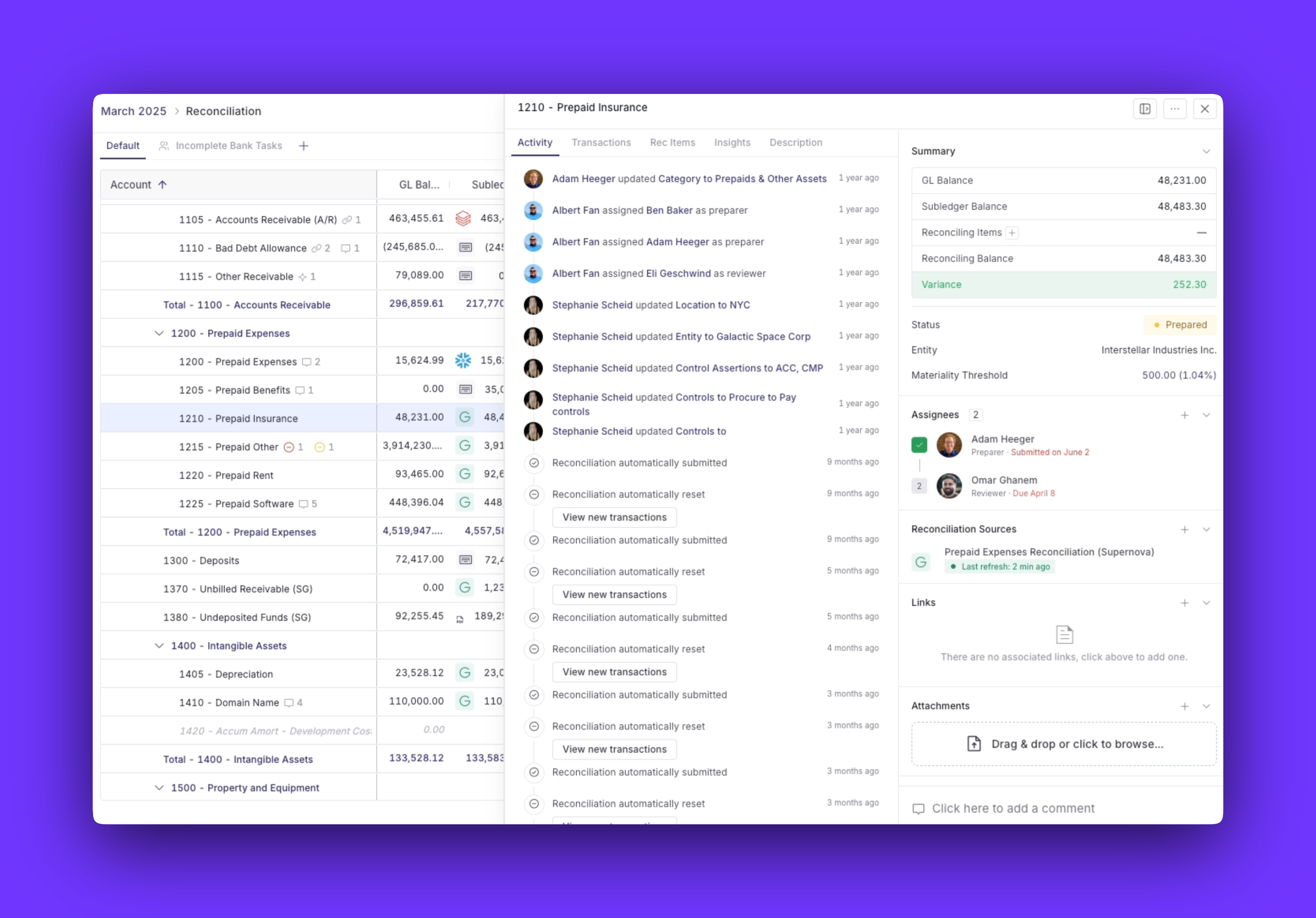
Audit-readiness is often the primary reason teams invest in automation. A strong platform captures who matched each transaction, who overrode a suggested match, who approved the reconciliation, and what changed after sign-off. With Numeric, auditors log directly into the platform and self-serve a complete activity trail — no need for your team to spend hours resurfacing required documentation.
For SOX compliance, documenting the segregation of duties between preparers and reviewers is a requirement, not a preference.
One capability that often gets overlooked is post-reconciliation monitoring. When a new transaction hits an account that's already been reconciled and signed off, modern platforms should alert the team immediately and point to the specific transaction that pushed the account out of balance.
.png)
Which Reconciliations To Automate First
Most teams evaluating reconciliation automation already know they need it. The real question is where to start, and sequencing matters because a poorly chosen pilot can create skepticism that slows down the entire initiative.
Generally, move from simple to complex:
- High-volume, low-judgment reconciliations first. Bank and cash reconciliations, predictable balance sheet accounts, and recurring clearing accounts have the cleanest data and the most straightforward matching logic. Cash reconciliation in particular can deliver dramatic results, with AI-powered matching handling 90%+ of transaction volume automatically.
- Medium-complexity operational reconciliations next. Accounts receivable reconciliation, accounts payable, credit cards, expenses, and processor settlements. These benefit from tighter integration with cash matching, journal entry workflows, and exception routing.
- Intercompany and multi-entity reconciliations last. Multi-book, multi-currency environments add real design complexity. Automation helps significantly, but you want your matching rules and reviewer controls proven out on simpler accounts first.
Building The Business Case For Reconciliation Automation
The harder part of reconciliation automation is convincing the CFO, the budget committee, or the broader finance leadership team to fund it. Numeric lays the foundation for accounting teams in hypergrowth — scale the close as a repeatable, enforced process so team growth doesn't introduce new handoffs, bottlenecks, or unpredictability.
- Hard-dollar and time-based ROI. Model current-state labor hours across all reconciliation types, then estimate the target state. A reasonable baseline for well-implemented automation is a 50–70% reduction in total reconciliation labor hours.
- Layer on secondary savings: Fewer days in the close, reduced overtime, lower audit-prep effort, and the ability to absorb transaction volume growth without proportional headcount increases. Use a conservative 50% reduction for internal planning rather than vendor case-study results.
- Total cost of ownership (TCO) beyond license cost. A realistic TCO includes implementation services, internal project time, training, data cleanup, workflow redesign, and ongoing rule maintenance. Finance leaders frequently underestimate integration work and change management in particular.
Don't forget to tailor your pitch by stakeholder:
- For CFOs, focus on risk reduction, cash visibility, and scale without proportional headcount growth.
- For Controllers, prioritize close speed, reconciliation completion rates, and audit readiness.
- For senior accountants, talk about workload reduction on repetitive matching and more time for work that requires their expertise.
Numeric: making account reconciliations as easy and automated as possible
.png)
A Realistic Implementation Roadmap
Reconciliation automation is not a flip-the-switch project. The teams that get the strongest results treat it as a phased rollout with clear milestones, not a single deployment date.
Phase 0 — Process Readiness And Scoping
Before you touch a platform, audit your current state.
Map every reconciliation type your team performs: the account category, the data sources involved, the matching logic (even if it's informal), the current exception rate, the reviewer workflow, and the close dependency. A balance sheet reconciliation audit is often the best place to start.
This exercise often surfaces surprises, which may include reconciliations that no one owns clearly, accounts where the matching logic changes based on who's doing the work, or source data that's messier than anyone realized.
At this stage, you also want to standardize naming conventions, materiality thresholds, documentation requirements, and ownership assignments. If three different people reconcile the same account type using three different approaches, automating that process will just automate inconsistency.
And one important warning: Do not automate a broken process. If your current reconciliation workflow has unclear ownership, inconsistent source data, or poorly defined materiality rules, automation will not fix those problems. It will scale them.
Phase 1 — Pilot One Or Two Controlled Use Cases
Pick one high-volume, well-understood reconciliation and run it through the platform end-to-end. Bank reconciliation is the most common starting point. However, if your team also manages high-volume cash matching, pairing both in the pilot can show broader workflow impact.
The pilot should validate several things in sequence:
- Source system connectivity and data quality
- Matching rule design and accuracy
- Exception behavior and categorization
- Reviewer workflow and controls
- Team adoption and trust
During the pilot, these are the practical milestones to focus on:
- Source connection confirmed and data refreshing on schedule
- Initial rules designed and tested against historical data
- Parallel run alongside existing process (typically one to two close cycles)
- Reviewer sign-off on automated results
- KPI baseline established (match rate, exception rate, cycle time, hours saved)
- Go/no-go decision for expansion
Phase 2 — Expand Coverage And Connect Workflows
Once the pilot is stable, expand into additional account categories, entities, or transaction types. This is also the phase where the most value gets unlocked, because the gains come from connecting reconciliation to the rest of the close, not from automating accounts in isolation.
Platforms like Numeric that tie reconciliation, close management, cash matching, and monitoring together in one workflow make this integration native rather than something your team has to build. With the Numeric MCP, controllers can trigger reconciliation tasks, surface flagged items, and take action directly from their AI workspace — without switching between tools.
Phase 3 — Optimize, Measure, And Evolve
Automation isn't a one-time project, and it needs ongoing tuning.
Build a quarterly cadence that accounts for the following:
- Rule review: Are rules still matching accurately as transaction reconciliation patterns change?
- Exception analysis: Are the same exception types recurring, and can they be addressed with a new rule?
- Threshold updates: Do your materiality levels still reflect the business?
- Control reviews: Are preparer-reviewer workflows functioning as designed?
- Expansion planning: Which additional reconciliation categories is the team ready to take on?
After go-live, track these KPIs:
- Efficiency: Days to close, reconciliation cycle time by account type, manual hours per category, and percentage of accounts completed on time.
- Automation quality: Auto-match rate by workflow, exception rate and aging, false positive rate, and post-close adjustments tied to reconciliation issues.
- Control impact: Late or unreconciled high-risk accounts, audit-prep effort, reviewer bottleneck rate, and real-time visibility improvements.
Your close is only as good as the data behind it. Numeric keeps it accurate in real time.
Data Quality And Controls Requirements
Reconciliation automation is only as strong as the source data and controls around it. This is the single most common reason implementations underperform.
Data Readiness Comes First
Before going live, assess the following across every account you plan to automate:
- Master data hygiene: Are entity names, account codes, and vendor IDs consistent between your ERP and supporting systems? Mismatched identifiers are the most common source of matching failures.
- Chart-of-accounts consistency: If you're reconciling across entities, do those entities use the same account structure? Even minor differences (like a parent entity using a four-digit code and a subsidiary using five) can break matching rules.
- Timing alignment: Are your bank feeds, ERP postings, and subledger updates all arriving on compatible schedules? A two-day lag between your bank data and your GL can create false exceptions that waste reviewer time.
- Reference-field completeness: Matching rules often rely on memo, reference, or description fields. If those fields are inconsistently populated (or blank), your match rate will suffer regardless of how sophisticated the engine is.
Here's the starting pre-automation data readiness checklist you need:
- Verify that entity and account naming conventions are standardized.
- Confirm that source systems refresh on schedules compatible with your reconciliation cadence.
- Audit reference-field completeness for your top 10 highest-volume accounts.
- Identify any manual data transformations (pivot tables, VLOOKUP chains) that currently sit between your source data and your reconciliation.
- Clean up or document these before migrating to a platform.
Embedding Internal Controls In The Workflow
Automation should embed controls into the workflow so they happen consistently rather than relying on someone remembering to follow the process.
Preparer-reviewer separation should be enforced by the platform, not by team norms. That means:
- If an accountant matches a transaction, a different person should approve the reconciliation.
- Override permissions should be restricted and logged, and if someone manually forces a match that the system flagged as questionable, that action should be visible in the audit trail with a documented reason.
- Materiality thresholds should be configurable by account type and applied automatically, so low-risk accounts that tie out can auto-submit while higher-risk accounts require manual review.
For SOX-regulated organizations, the platform should be able to demonstrate that controls are operating consistently. Modern account reconciliation software embeds these controls natively. It needs to provide timestamped evidence of who prepared, who reviewed, who approved, and what changed at every step.
Change Management And Team Adoption
The people side of reconciliation automation is where many implementations quietly fail. The technology works, but the team reverts to spreadsheets when things get stressful.
Automation As Augmentation, Not Replacement
Many workers have worried at some point that AI would take their jobs, which can increase resistance and delay adoption.
Address this directly: AI isn't here to replace accountants. Your company will not use reconciliation automation to eliminate accounting jobs. It changes what accountants spend their time on. The shift is from full manual preparation — exporting, matching, documenting, emailing — toward investigation, review, interpretation, and workflow stewardship.
Here's a concrete example. Before automation, a staff accountant might spend four hours matching 500 bank transactions, investigating 30 exceptions, and preparing documentation for reviewer sign-off.
After automation, the platform matches 475 of those transactions. The accountant now spends their time on the 25 remaining exceptions, including investigating root causes, determining whether correcting entries are needed, and documenting their findings. The skill required is more analytical, not less. The time required is dramatically lower, but there's still a need for your professional team.
Building Champions And Training Into The Rollout
Don't treat training as a single onboarding session. Designate process owners by workflow or entity. This should be someone who understands both the accounting context and the platform mechanics.
Then, train preparers on how to work within the automated workflow. Train reviewers on how to evaluate automated results, and train admins on rule management, threshold configuration, and escalation setup.
The most important training isn't how to click within the tool, but instead is how to interpret what the platform gives you. Your team needs to understand when to trust an automated match, when to investigate, and when to override. That judgment is the accountant's value-add, and it should be developed deliberately.
Redesigning The Team's Operating Model
When reconciliation automation works well, it reshapes how the team operates day to day. Meeting cadences shift:
- Instead of a frantic review session at month-end, teams can monitor exception dashboards throughout the month.
- Escalation paths become clearer because the platform surfaces aging items automatically.
- KPIs become more granular because cycle times, match rates, and exception patterns are now measurable at the account level. And when reconciliations are running continuously, you can answer your CFO and FP&A team's questions instantly, instead of waiting until close to have confidence in the numbers.
This is also an opportunity to rethink workload distribution. If your most experienced accountant was previously spending 30% of their close on bank reconciliations, that capacity is now available for higher-value work, such as process improvement, cross-functional analysis, or preparing for the strategic projects that always get pushed to after close.
Common Failure Modes And How To Avoid Them
Here are the patterns we see most often in reconciliation automation projects that underperform:
- Automating a broken process. If your current reconciliation lacks a single documented matching approach, clear ownership, or agreed-upon materiality thresholds, automation will scale that inconsistency. Standardize first.
- Underestimating integration and data prep. Integration is often the real blocker, especially in multi-system environments. Assess source-system quality early: data format, refresh frequency, and whether the platform supports the integrations you need natively.
- Designing weak exception workflows. A 90% auto-match rate sounds impressive, but if the remaining 10% sits in an unstructured queue with no owner and no SLA, the team's experience won't feel much different from spreadsheets. Define exception categories, assign owners, and build escalation paths before go-live.
- Treating AI claims as proof of business value. When evaluating platforms, ask how the AI learns, whether your team can see why it suggested a match, and what happens when it encounters a transaction type it hasn't seen before.
The close doesn't have to be a sprint. Numeric keeps reconciliations running all month.
How Numeric Supports Reconciliation Automation
Rather than treating account reconciliation as a standalone module, Numeric connects it to the broader close so your reconciliation status, exception resolution, cash matching, journal entries, and monitoring all live in the same workflow — and surfaces all of it through the Numeric MCP so your team can take action without switching tools.
- Real-time ERP integration pulls trial balance data and transaction-level detail directly from your GL (NetSuite, Xero, QuickBooks, or Sage Intacct). When a transaction posts, it's visible in Numeric.
- Transaction-level drill-down shows the exact GL transactions causing an account to fall out of balance. Instead of hunting through ledger reports to figure out why something doesn't tie, your team sees the specific line items behind the discrepancy.
- Proactive change alerts monitor already-reconciled accounts for new transactions. If something posts after sign-off, the platform flags it immediately and points to the specific transactions so your team can assess the impact without re-reconciling from scratch.
- Cash management features that extend reconciliation automation into cash matching, with an AI-powered rules engine that auto-matches 90%+ of transactions, one-click batch posting of journal entries directly to NetSuite, and bank integrations with institutions globally. For example, Brex uses Numeric to automate 95%+ of cash recs across 100+ accounts.
- Cloud storage integration with Google Drive, SharePoint, and Box pulls in subledger workpapers and lets teams edit them directly within the platform. No more downloading, updating, and re-uploading spreadsheets.
- Auto-submission for accounts that tie out and remain under a set materiality threshold, so teams don't burn time manually signing off on predictable, low-risk accounts.
- Transaction monitors that catch errors and policy violations in real time throughout the month, including well before the close starts. Teams can build custom alerts using natural language through the AI Monitor Builder, or start with pre-built templates for common use cases.
Since reconciliation lives inside the same platform as close management, flux analysis, and reporting, the connection points are native. This means:
- When a reconciliation completes, the close checklist updates.
- When a monitor flags an anomaly in a reconciled account, the team sees it in context.
- When an exception requires a journal entry, it can be drafted and posted without switching tools.
The Bottom Line
Reconciliation automation is part of building a faster, more controlled, and more strategic finance function. The entire close gets better when reconciliations are running continuously so you can surface and resolve exceptions and maintain a comprehensive trail.
But the single most important takeaway from this piece is straightforward: standardize before you automate. Clean up ownership, document matching logic, set materiality thresholds, and fix source data quality before putting a platform on top of it. The teams that skip this step end up with slightly faster versions of the same problems they already had.
The best reconciliation automation strategies start with these principles:
- Prioritization: Pick the right accounts first
- Process cleanup: Fix what's broken before you scale it
- Strong exception design: Determine where exceptions matter most, since the 5–10% that doesn't auto-match is where the real work lives
Get those right, and the technology will do what it's supposed to by letting your team focus on the work that actually requires their judgment.
Frequently Asked Questions About Reconciliation Automation
Automation should embed controls rather than bypass them. Preparer-reviewer separation needs to be enforced by the platform — not team convention — so that the person matching transactions cannot also approve the reconciliation. Override permissions should be restricted and logged with documented reasons. Materiality thresholds should apply automatically by account type, routing low-risk accounts to auto-submission while keeping high-risk accounts in manual review.
The platform also needs to provide timestamped, tamper-resistant evidence of every action for Section 302 and 404 requirements — not just a summary of who approved, but a complete record of what was matched, what was overridden, and what changed after sign-off.
Rules-based engines degrade over time if no one maintains them. New vendors, renamed entities, changed reference field formats, and acquired subsidiaries all create false exceptions. A strong platform learns from historical match patterns and surfaces rule update suggestions when it detects declining accuracy — rather than requiring a third-party consultant or admin to modify logic every time something changes.
Build a quarterly rule review into your ongoing operations cadence. Treat matching logic as a living system, not a one-time setup. Teams that skip this step typically see their manual exception queue grow back toward pre-automation levels within 12 to 18 months.
Multi-entity and multi-currency reconciliations are the most complex to automate and should come last in any sequencing plan. The core challenges are chart-of-accounts inconsistency across entities, FX timing differences between GL postings and bank settlements, and intercompany eliminations that don't resolve cleanly without matching context.
Most modern platforms handle multi-currency natively, but multi-entity environments require confirmed account structure alignment and entity mapping before automation goes live. If those foundations aren't in place, you'll generate false exceptions at scale that are harder to resolve than the manual process you replaced.
Deep enough to pull transaction-level GL data directly — not just trial balance summaries. Platforms that rely on periodic CSV exports rather than live API connections create timing gaps that generate false exceptions and give reviewers a stale view of account status.
For NetSuite users specifically, look for platforms that support posting journal entries directly from the exception workflow — eliminating the need to switch back to your ERP to resolve items. The fewer tool switches in the exception resolution workflow, the faster your team moves through unmatched items.
Ask three things: what is the match rate on accounts similar to yours specifically, not headline averages across all customers; can your team see the rationale behind each suggested match, or is it a black box; and what happens when the AI encounters a transaction type it hasn't seen before.
Platforms that can't explain their matches create more reviewer skepticism than confidence — which defeats the purpose of automation. If a preparer doesn't trust that a suggested match is correct, they'll manually verify every one, and you've added a step rather than removed it. Explainability isn't a nice-to-have; it's what determines whether your team actually adopts the automation.
Related Content
.png)
Expense Allocation in Accounting: From Shared Costs to True Margins (and Why the Usual Methods Break)
Learn what expense allocation involves, why it's essential for fully loaded P&Ls and true margins, and why spreadsheet models and aggregate JEs keep failing, plus how to fix the root cause.
.png)
Multi-Entity Consolidation: What It Involves, Why It Breaks, and How to Fix It
Learn what multi-entity consolidation involves, why it breaks as companies grow, and why both Excel and add-on tools share a structural flaw. A guide for controllers and VPs of finance.
.png)
How to Build an AI Audit Trail for Your Accounting Workflows
A practical guide to AI audit trails for accounting: what to capture, why SOX, PCAOB, and GAAS require traceability, and how to audit AI agents and skills, not just AI features bolted onto your close software.