Xero vs. NetSuite: How to Choose as Your Accounting Grows

Xero is built for small businesses that want fast setup and a low monthly bill, and it does that job well. Once a company adds a second entity or signs its first usage-based contracts, the gaps show up quickly. Xero has no native consolidation across entities or built-in revenue recognition, and reporting runs on two tracking categories.
When companies start butting up against these limitations, they often move to an ERP like NetSuite. NetSuite puts all subsidiaries in one database, automates consolidation and intercompany transactions, and adds modules for revenue recognition, inventory, and order management. The tradeoff is that it costs significantly more, can take months to implement, and still requires workarounds for some reporting and traceability.
In this post, we'll compare Xero against NetSuite, explain when you may need to move from Xero to a more advanced platform, and share when a tool like Numeric's Financial Data Platform may be a better option for your business.
Key Takeaways
- Xero works for single-entity small businesses with straightforward revenue, a small finance team, and simple reporting needs.
- NetSuite can benefit multi-entity companies with complex revenue and broader operations, including inventory management, revenue recognition, and automated consolidation across subsidiaries.
- The clearest sign a team has outgrown Xero is consolidation and revenue schedules that live in spreadsheets, because those workarounds are time-consuming and create audit risk that compounds.
- NetSuite's full cost includes the license, per-user fees, modules, and implementation, and most teams add point solutions around it to fill reporting and automation gaps.
- Numeric's ERP replacement, the Financial Data Platform, is a third option that handles multi-entity consolidation, subscription and usage revenue, and flexible reporting without flattening every transaction into a journal entry.
Xero vs. NetSuite Feature Comparison
The table below compares the two systems on the areas that matter most once a company starts to grow.
| Feature | Xero | NetSuite |
|---|---|---|
Best fit | Single-entity small businesses with simple revenue and a small finance team | Multi-entity companies with complex revenue, inventory, and broader operations |
Multi-entity and consolidation | Each entity is a separate organization with no native consolidation | OneWorld runs all subsidiaries in a single database with automated consolidation |
Intercompany | Manual booking and matching in each organization | Automated intercompany transactions and elimination entries |
Multi-currency | Supports foreign currency invoicing and bank accounts on the Established plan | Full multi-currency with automatic translation at consolidation |
Revenue recognition | Manual, usually managed in spreadsheets | Native Advanced Revenue Management module (ASC 606 / IFRS 15) |
Reporting and dimensions | Chart of accounts plus two active tracking categories | Financial Report Builder, saved searches, and custom segments and dimensions |
Audit trail and permissions | Basic audit log with limited role controls | Granular role-based permissions and detailed audit trail |
Implementation time | Hours to days, no implementation partner needed | Months, usually with an implementation partner |
Pricing model | Flat monthly fee per plan, no per-user charge | Annual license plus per-user fees, add-on modules, and implementation |
Integrations and ecosystem | 1,000+ third-party apps in the Xero app marketplace for payroll, inventory, and other needs | Native modules cover more out of the box, plus the SuiteApp marketplace for extensions |
Support model | Online help center and support requests | Tiered support plans alongside an implementation partner |
Day-to-day admin | Self-service by the bookkeeper or accountant | Usually requires a NetSuite admin or consultant |
Teams on QuickBooks run into many of the same limits, and the NetSuite vs. QuickBooks comparison walks through that version of the decision.
Comparing Xero and NetSuite? See an ERP replacement built for complex accounting that doesn't require a single cutover.
What Xero Does Well for Small Businesses
Xero is purpose-built for small businesses, and within that scope, it does the daily work well.
Fast Setup and Clean Day-to-Day Bookkeeping
Xero is an accounting platform that has a great reputation with small businesses because it removes friction from the daily work.
- Bank feeds pull transactions automatically, so reconciliation is matching rather than re-keying.
- Invoicing and bill pay run from the same interface without toggling between tools.
- The app marketplace extends Xero into payroll, inventory, time tracking, and dozens of other functions through 1,000+ integrations, so a small team can assemble what it needs without a systems project.
A bookkeeper or accountant can set up a new Xero organization in a day, and no one needs an implementation partner or a dedicated admin to keep it running.
Transparent, Low-Cost Pricing
Xero's US pricing is straightforward. Three plans, each a flat monthly fee with no per-user charges (so it doesn’t get more expensive when you add new people to the plan):
- Early at $27 per month, covering quotes, up to 20 invoices, and 5 bills
- Growing at $59 per month, removing the invoice and bill limits and including auto-reconcile
- Established at $97 per month, adding multi-currency, expense claims, and project tracking
When Xero Is the Right Accounting System
Xero is the right system for a single-entity business with straightforward revenue, a small finance team, and reporting needs that the chart of accounts and two tracking categories can handle.
If your month-end close process on Xero runs in a few days and revenue recognition doesn't require schedules outside the ledger, Xero is a cost-effective and simple solution. It may be all that you need for right now.
Xero Limitations for Growing Companies
Xero's limitations tend to surface as your company grows. If you add more entities, expand internationally, or sign your first usage-based contracts, you’ll likely feel them. Expanding internationally also means moving to the Established plan, the only tier that includes Xero multi-currency support. These are the limits teams usually run into first.
No Native Multi-Entity Consolidation
Each legal entity in Xero lives in its own organization, and standard plans don’t combine them.
That means Xero consolidation is a monthly manual process. You need to export a trial balance from each org, map accounts to a group chart, translate each entity's results into the reporting currency, book and match intercompany in each org separately, eliminate in a spreadsheet, and tie the result back to each entity's ledger.
The workload multiplies with each new entity. A three-entity consolidation is tedious but manageable. By six or eight, the spreadsheet is a control risk and the person who built it is a single point of failure. Consolidating multiple organizations has been a long-standing request on Xero's product ideas forum, but there aren’t any announced plans to build it.
No Native Revenue Recognition
Xero has no built-in revenue recognition module. For subscription and usage-based businesses, that means revenue schedules, along with the deferred and unbilled balances that come from them, live in spreadsheets.
Every contract change, whether an upgrade, a downgrade, or an early termination, means updating the schedule manually and posting correcting entries by hand.
This is a big risk come audit time. When an auditor samples revenue transactions and asks how each number was produced, the answer isn’t going to show up in your Xero records. Answering means reconstructing what happened from workbooks and email threads.
Two Tracking Categories are Locked-in at Setup
Xero allows two active tracking categories per organization, set once for the entire org.
Categories configured for a five-person company rarely reflect how a 50-person company wants to see the business. When leadership asks for results by product line, region, or customer segment that were never tagged, the team builds it in a side workbook and reconciles back to the books, and reproducing it means repeating the same manual steps.
Adding a new dimension after the fact means going back to tag years of historical transactions, or keeping the side workbook running indefinitely.
The Real Cost of These Limitations
These limitations can be significant for growing businesses.
The close takes longer, senior accountants spend more time assembling numbers than analyzing them, and audit prep stretches because key figures trace back to workbooks rather than the system.
When this happens, leadership ends up making decisions on financials that are weeks old by the time they're published. Delayed, hard-to-verify numbers also erode the trust a Controller needs to weigh in on headcount and pricing.
The best finance teams are becoming finance engineers. Get the weekly newsletter.
Signs Your Company Has Outgrown Xero
You've likely outgrown Xero if several of these describe your month.
- Consolidation runs in a spreadsheet. You're exporting trial balances from three or more Xero organizations, mapping accounts, and matching intercompany. All of it happens by hand, every month.
- Intercompany elimination happens outside the ledger. Both sides are booked by hand in each org, and the reconciliation happens in a workbook.
- Revenue schedules live in spreadsheets. Every contract change means recalculating and posting manual entries.
- The close keeps getting longer despite adding headcount. Extra people haven't fixed it because the bottleneck sits in the system.
- Leadership wants reporting cuts your two tracking categories can't produce. New dimensions mean side workbooks rebuilt by hand every period.
- An audit, fundraise, or acquisition is approaching and the evidence behind key numbers is scattered across workbooks. Tracing a number to its source requires multiple files and institutional knowledge.
At that point the question becomes which system to move to. Among Xero alternatives, NetSuite is the most common answer.
What NetSuite Adds, and What It Costs
NetSuite is designed for the multi-entity and revenue complexity that pushes teams off Xero, with a bigger bill and a few workarounds of its own.
Multi-Entity, Consolidation, and Broader ERP Scope
Oracle NetSuite's OneWorld edition puts all subsidiaries in a single database (per NetSuite's help center) with automated intercompany transactions and consolidation. Every transaction carries its subsidiary, currency translation runs automatically, and elimination entries post during the consolidation process rather than in a separate spreadsheet.
Beyond accounting, NetSuite adds native modules for revenue recognition (Advanced Revenue Management, supporting ASC 606 and IFRS 15), inventory management, order management, procurement, and project accounting. Companies that need operational systems alongside the general ledger often move to NetSuite for this reason.
The Full Cost Picture
NetSuite's pricing is structured differently from Xero's, with several separate parts adding up to the annual total.
- A base annual license
- Per-user fees that can vary by role type
- Add-on modules for products like advanced financials and revenue recognition
- Implementation partner fees for the initial build
- Potential consulting hours
Each new module and user raises the annual total, and implementation lands as a separate cost on top.
What Moving to NetSuite Does Not Change: NetSuite’s Limitations
NetSuite solves the multi-entity and consolidation problem that Xero can't handle, and it keeps the same underlying data model. It's a journal-entry-based ledger that records debits and credits against accounts, while the contract, usage event, or business context behind each entry lives in other systems or in the accountant's head.
Each month, that gap shows up in a few places.
- When billing runs in a separate tool, tying billing data back to recognized revenue still happens in a workbook.
- New reporting cuts that weren't anticipated during implementation require saved searches or exports to Excel, often with admin-level permissions.
- Audit trail assembly means switching between systems to trace how a number was produced, because the ledger holds the result but not the reasoning behind it.
Many teams end up layering point solutions on top of NetSuite to fill these gaps, such as a reporting tool, a reconciliation tool, or a revenue subledger, with each one solving a single problem while adding another system to maintain.

Why NetSuite Isn’t Your Only Next Step: Numeric's ERP Replacement
Teams outgrowing Xero have more than one path, so comparing NetSuite alternatives before committing to an implementation pays off. If the pain is consolidation, revenue recognition, and reporting flexibility, Numeric's Financial Data Platform belongs on that list.
The table compares NetSuite and the Financial Data Platform on the same areas.
| Dimension | NetSuite | Numeric's Financial Data Platform |
|---|---|---|
Data architecture | Journal-entry-based general ledger | Data-centric accounting, a data lakehouse with accounting intelligence built on top; journal entries are derived from the source objects |
Multi-entity consolidation | OneWorld single database with automated consolidation and intercompany eliminations | All entities in one system with consolidation built in; complex intercompany and transfer pricing are still on the roadmap |
Revenue recognition | Advanced Revenue Management module (ASC 606 / IFRS 15); purchased separately | Derived from contracts and usage events, with ASC 606 rules enforced by the system; schedules update automatically through contract modifications |
Reporting flexibility | Saved searches and native report builder; new cuts often require admin expertise | Report on any dimension without rebuilding the chart of accounts; no admin required |
Audit trail | Role-based permissions and system-generated trail | Every number drills to the object behind it, whether that's the contract, invoice, or usage event |
| AI features added in recent releases, such as AI-assisted bank matching and flux analysis, working from the transactions in the ledger | Numeric MCP for querying books through AI tools like Claude; App Studio for building internal apps on the same data | |
Implementation | Months-long; usually requires an implementation partner | Phased rollout in four stages; teams can run it in parallel with their legacy ERP until the numbers are proven |
Total cost | Annual license + per-user fees + add-on modules + implementation partner | Quoted per company based on scope, with reporting, subledgers, and billing and revenue in one system |
How the FDP Works Differently
Numeric's Financial Data Platform is an ERP replacement built for the work that pushes teams off Xero and that NetSuite still handles with workarounds.
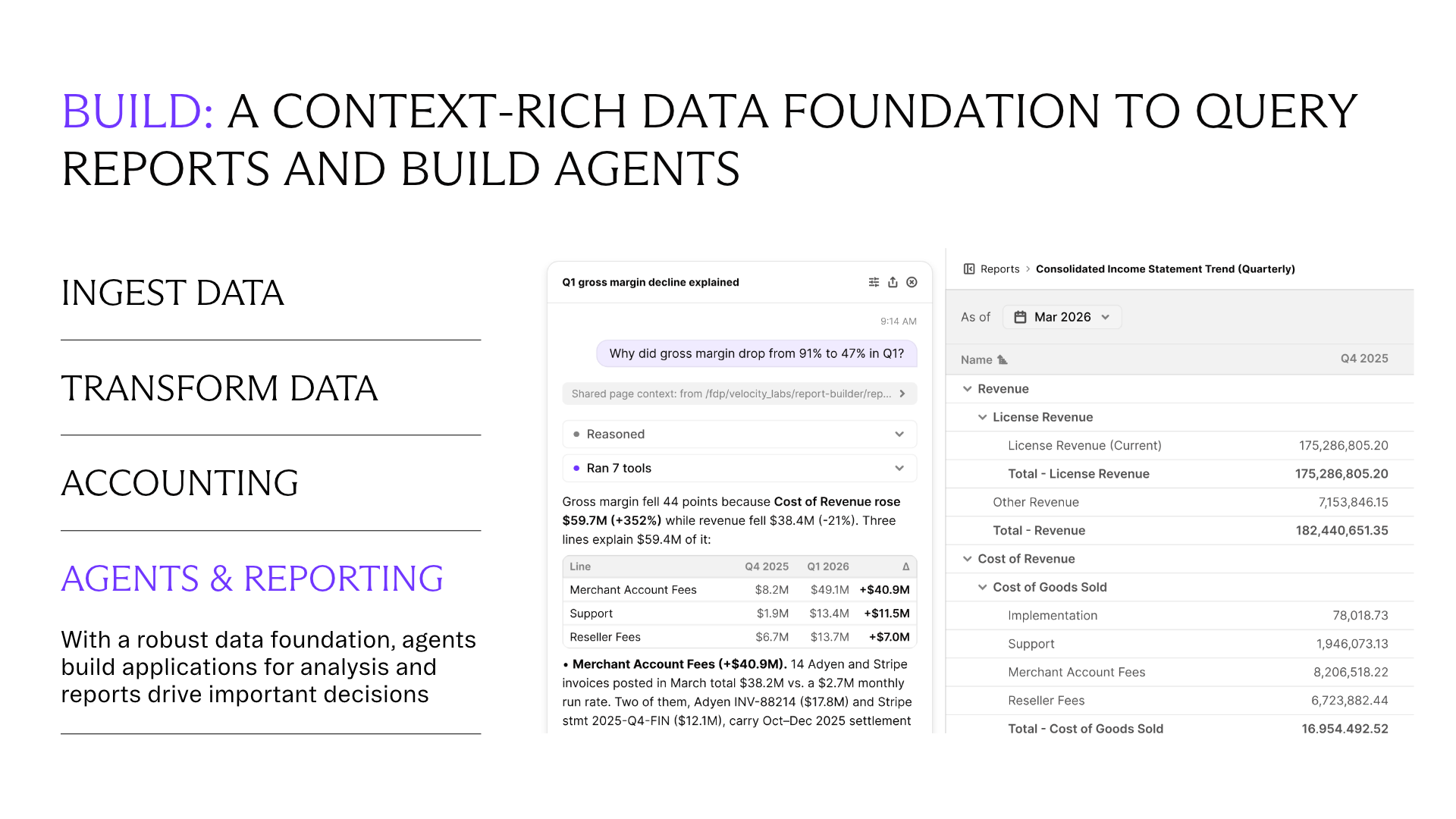
Both Xero and NetSuite flatten every transaction into a journal entry against a chart of accounts. The Financial Data Platform practices data-centric accounting instead. It keeps long-lived objects like contracts, invoices, and leases, the relationships among them, and the business events that happen to them in one place, then derives the accounting from it.
This means that journal entries still exist, but they're an automatic output, and every number drills back to the object it came from. In practice, it's a data lakehouse with accounting intelligence built on top, a different design from a traditional ERP.
What Day-to-Day Accounting Work Looks Like on the Financial Data Platform
On Xero, much of the month goes to moving numbers between places. Trial balances get exported from each organization and mapped by hand, revenue schedules get rolled forward in a workbook, and leadership's reporting requests turn into side spreadsheets that someone has to reconcile back to the books.
On the Financial Data Platform, your team sets up its accounting policies once as rules in Flows and Ledgers. A rule might cover when revenue is recognized or how a prepaid amortizes, and the same input always produces the same entry.
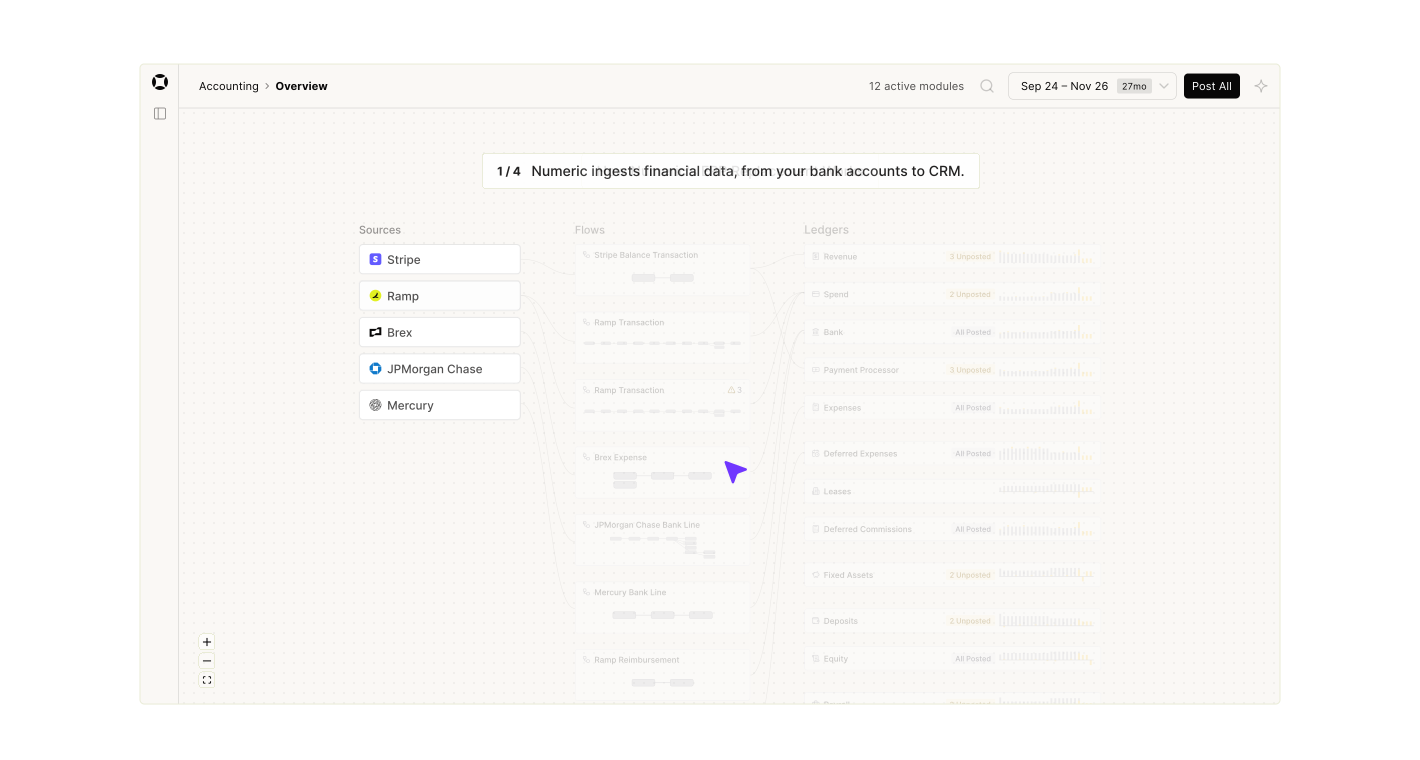
Here's how the tasks above look once that's in place.
- Month-end consolidation. Every entity already lives in the same system, so the consolidated view is ready without pulling a trial balance from each org or maintaining a separate consolidation workbook.
- Contract changes. When a customer upgrades, downgrades, or ends early, the change is applied to the contract itself, with the modification accounted for the way the change requires, whether that's a separate contract, a prospective change, or a cumulative catch-up. The schedule and journal entries update from there. Your team reviews what changed rather than recalculating the schedule and posting correcting entries by hand.
- Usage-based revenue recognition. Usage data from your own systems is matched to the contract line it belongs to and turned into invoices, with revenue recognized under your rules. Usage that doesn't match a contract line gets flagged for review before it reaches the books.
- Hybrid billing. When a contract pairs a subscription with consumption-based charges, both are billed from the same contract. The revenue schedule follows the performance obligation behind each piece, so the subscription is usually recognized ratably over the term and usage is recognized in the period it happens.
Across all of these, the team's time moves away from assembling numbers and toward reviewing exceptions and explaining what the numbers mean for the business.
It's built for any team whose accounting complexity is growing beyond what a journal-entry-based ledger can handle cleanly. Fintech, SaaS, and usage-based revenue businesses tend to see the biggest gains, since contract changes, metered billing, and multi-element arrangements drive the most manual work.
Total Cost of Ownership Compared to NetSuite
NetSuite's license is only part of the bill once the point solutions around it are counted.
The Financial Data Platform covers the reporting and subledger work those tools handle in a single system.
Pricing is quoted per company based on scope, so the clearest comparison is your current NetSuite spend plus every tool layered on top of it.
See why Built replaced NetSuite with Numeric's Financial Data Platform.
Results: How Built Replaced NetSuite With the Financial Data Platform
Built replaced NetSuite with the Financial Data Platform and freed up 2 FTEs worth of bandwidth from billing and revenue work while delivering invoices 4 business days earlier. "We were pushed to decide: do we upgrade our systems, or do we just add more people?" said Controller Asia McKnight.
That's the same question teams outgrowing Xero face. Adding headcount absorbs the manual work for a while, but the system constraints stay, and the workarounds grow with every new entity, contract, and reporting request.
How a Phased Migration to the Financial Data Platform Works
The usual worry with a newer system is being the test case, and a phased rollout answers that. Numeric's switching guide walks through four stages (build the foundation, migrate data and accounting policies, cut over, then hypercare), and teams can run the Financial Data Platform in parallel with their current books until the numbers are proven.
Numeric's team works alongside your accountants from kickoff through hypercare and stays involved after go-live.
See the Financial Data Platform in action. Book a demo with our team to walk through how it works.
Choosing Between Xero, NetSuite, and Numeric
The Xero vs. NetSuite decision usually starts when the accounting outgrows a single-entity, single-currency setup. NetSuite handles the multi-entity problem, but it keeps the same journal-entry architecture, costs significantly more, and usually needs point solutions layered around it.
Numeric's ERP replacement, the Financial Data Platform, gives teams a third path. It handles the same consolidation and revenue work while keeping the contracts and events behind each number, so reporting and audit questions get answered from the system itself. Complex intercompany and transfer pricing are still on the roadmap, so teams with those needs should raise them early in an evaluation.
The right choice depends on how complex your accounting is likely to get over the next few years, and how much of that complexity you want living in spreadsheets.
If your team is outgrowing Xero and weighing its next system, ask about Numeric's ERP replacement.
Frequently Asked Questions About Xero vs. NetSuite
In a Xero vs. NetSuite comparison, NetSuite is the more capable system with deeper functionality, and the right fit depends on the company's size, entity structure, and accounting complexity.
Xero suits single-entity small businesses with straightforward revenue and a small finance team. NetSuite suits multi-entity companies with complex revenue, inventory, and broader operational needs. A single-entity company on Xero would be paying for capabilities it doesn't use on NetSuite, while a multi-entity company on Xero is doing work by hand that NetSuite automates.
A company should evaluate a move when the monthly close work becomes unsustainable. These are the most common triggers.
- Spreadsheet consolidation across three or more entities
- Revenue schedules maintained outside the ledger
- Reporting needs that exceed what two tracking categories can produce
- An upcoming audit, fundraise, or acquisition that will test traceability directly
Xero can run multiple entities, but each one lives in its own organization, and standard plans do not consolidate them natively.
Teams managing multiple Xero organizations either add a third-party consolidation app or build consolidated financial statements from spreadsheet exports, manual account mapping, and external workbooks. The workload scales with entity count and the number of intercompany relationships between them.
How long it takes to migrate Xero to NetSuite depends on how many entities are moving, how much transaction history needs to migrate, and which modules are being implemented. Simple deployments can take three to four months, while multi-entity implementations with revenue recognition, inventory, and custom workflows can run six months or longer.
Xero charges a flat monthly fee (between $27 and $97 per month depending on the plan) with no per-user charges. NetSuite is priced as an annual license plus per-user fees, add-on modules, and implementation, and the total cost is substantially higher.
Numeric's Financial Data Platform is an ERP replacement built for companies with real accounting complexity, including multiple entities, subscription and usage revenue, and reporting needs that change as the business grows. Complex intercompany and transfer pricing are still on the roadmap.
It pulls contracts, invoices, and usage in from the systems you already use and derives the accounting from them, so teams get the capabilities that drive most Xero-to-NetSuite moves without taking on another journal-entry-based ERP.
Related Content

8 Revenue Recognition Solutions for SaaS and AI Finance Teams
Compare eight revenue recognition solutions by how they handle billing data, usage, contract changes, and ASC 606, plus pricing and who each one fits.

Metered Billing Solutions: A Buyer's Guide for SaaS and AI Finance Teams
Compare the main types of metered billing solutions, decide what your team should own, and learn what to ask vendors about invoicing and revenue recognition.

Is Your AI Bill Growing? Here Are the Steps to Take Before You Tighten Team Budgets
How finance leaders at Glean, Figma, and Numeric track AI charges, set token budgets, and lower the cost of recurring AI work.